

History Companion – Browse, Save & Find

Overview
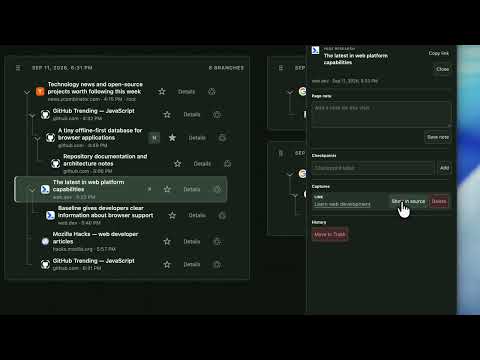
Browse in visual trees. Search pages and saved text, add notes, save links and images, and return to anything later.
Stop keeping tabs open just because you’re afraid you’ll lose your place. History Companion is a visual browser history extension that helps you keep track of where you’ve been, what you found, and how to get back to it. Instead of a flat browser history, it turns your browsing into connected visual history trees. You can follow browsing paths, save useful content, search your history, organize important branches, and return to things you found earlier. WHAT YOU CAN DO • See your browsing as visual history trees Follow the paths and branches you took between pages. • Search your browsing history and saved content Find previous pages, saved text, notes, links, images, and other saved content. • Save text directly from a page Select useful quotes, snippets, or information and keep them connected to where you found them. • Add notes Attach your own notes to useful pages and browsing branches. • Save links, images, and media Keep useful content connected to the page and branch where you discovered it. • Keep important paths in My Branches Favorite useful browsing branches, rename them, and return to them later. • Close tabs without losing your context Your browsing paths remain available in History Companion, so you don’t need to keep tabs open just in case. • Find your way back Search for something you saw earlier and return to where it appeared in your browsing history. • Remove clutter safely Move unwanted branches to Trash and restore them later if you change your mind. • Back up your History Companion data Export and import your history, saved content, and workspace data. • Customize History Companion Choose your theme, interface size, and language. • Stay organized automatically Use cleanup rules, filters, workspace controls, quick popup access, and more. FEWER TABS. LESS MESS. BETTER CONTEXT. Normal browser history tells you which pages you visited. History Companion also helps you understand how you got there, what you found along the way, and which browsing paths were useful. Use it for: • research • studying and learning • tab management • shopping and comparing products • troubleshooting • planning trips • collecting useful information from across the web • finding something you remember seeing but can’t find again • returning to unfinished browsing • keeping your browsing organized without leaving too many tabs open VISUAL BROWSER HISTORY Instead of a simple chronological list, History Companion shows your browsing as connected history trees. This makes it easier to retrace your steps, understand how pages are related, and return to useful browsing paths. YOUR BROWSING STAYS LOCAL History Companion stores its history trees and saved content locally in your browser. To build the trees, it records the URLs, page titles, timestamps, and navigation relationships of pages you visit while the extension is enabled. Selected text, notes, links, images, and media are saved only when you explicitly choose to save them.
0 out of 5No ratings
Details
- Version0.2.0
- UpdatedSeptember 24, 2026
- Offered byKimateGroup
- Size644KiB
- Languages7 languages
- Developer
Email
kimatemarketcompanion@gmail.com - Non-traderThis developer has not identified itself as a trader. For consumers in the European Union, please note that consumer rights do not apply to contracts between you and this developer.
Privacy

This developer declares that your data is
- Not being sold to third parties, outside of the approved use cases
- Not being used or transferred for purposes that are unrelated to the item's core functionality
- Not being used or transferred to determine creditworthiness or for lending purposes
Support
For help with questions, suggestions, or problems, please open this page on your desktop browser