

Hiroo Talent Radar — Job Change & Talent Alerts

Overview
Track job changes, promotions and talent movements automatically. Alerts via email, Slack & Teams.
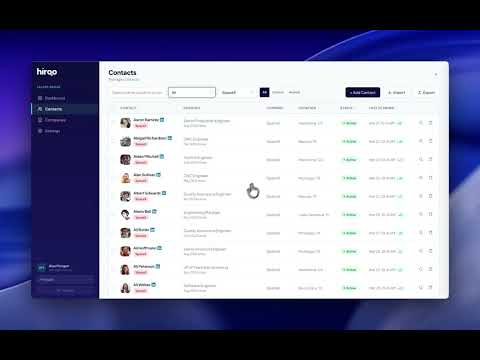
Hiroo Talent Radar automatically tracks professional profiles and alerts you when people change jobs, get promoted, or update their career status. HOW IT WORKS 1. Add contacts or import entire company employee lists 2. The extension scans profiles daily from your own Chrome browser 3. Get instant alerts via email, Slack, or Microsoft Teams when changes are detected WHAT IT DETECTS • Job departures and company changes • Title changes and promotions • "Open to Work" status updates • Headline and summary edits • Education and skill changes KEY FEATURES • Daily automated scanning (up to 200 profiles/day) • Company employee tracking with org chart view • Hidden Gems — subtle profile signals that indicate availability • Slack & Microsoft Teams integration • PDF, Excel, and CSV export • Tagging, bulk actions, and message templates • Works with any account type (Free, Premium, or paid plans) PRIVACY & COMPLIANCE Runs entirely in your own browser using your own session. No proxies, no shared cookies, no server-side scraping. Your data stays yours. GDPR & KVKK compliant. PRICING 14-day free trial, no credit card required. Plans start at $9/month (annual). Visit hiroo.app to learn more.
5 out of 59 ratings
Details
- Version2.2.9
- UpdatedOctober 19, 2026
- Size76.23KiB
- LanguagesEnglish (United States)
- Developer
- Non-traderThis developer has not identified itself as a trader. For consumers in the European Union, please note that consumer rights do not apply to contracts between you and this developer.
Privacy

Hiroo Talent Radar — Job Change & Talent Alerts has disclosed the following information regarding the collection and usage of your data. More detailed information can be found in the developer's privacy policy.
Hiroo Talent Radar — Job Change & Talent Alerts handles the following:
This developer declares that your data is
- Not being sold to third parties, outside of the approved use cases
- Not being used or transferred for purposes that are unrelated to the item's core functionality
- Not being used or transferred to determine creditworthiness or for lending purposes
Support
For help with questions, suggestions, or problems, visit the developer's support site