

Hint - Quick Notes. No Pen.
2 ratings
)
Overview
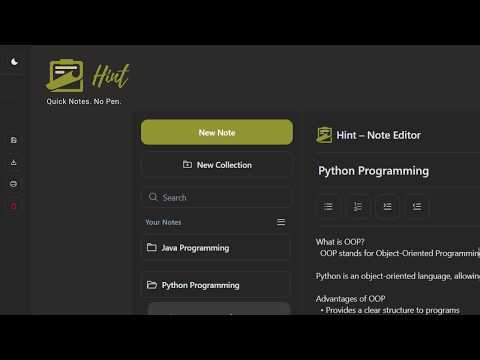
Save and organize notes instantly while browsing. Create collections and access everything quickly from a side panel.
Hint — Quick Notes. No Pen. Save, organize, and manage notes instantly while browsing — without switching tabs or breaking your flow. Hint lets you capture text from any website and turn it into well-organized notes in seconds using a clean side panel editor built directly into Chrome. How It Works 1. Browse any website 2. Select the text you want to save 3. Right-click and choose “Add to Notes” or press Ctrl + Shift + Y 4. The Hint side panel opens with your selected text 5. Edit if needed 6. Save to an existing note or create a new note and collection No copying. No pasting. No tab switching. Powerful Side Panel Notes Editor Manage everything in one clean workspace: • Create, edit, and delete notes • Organize notes into collections • Rename notes and collections anytime • Move notes between collections • Preview and edit selected text before saving • Distraction-free writing experience • Quick access to your full dashboard Export Your Notes Anytime Download your notes whenever you need them: • Word document (.doc) • Text file (.txt) • Print to PDF Perfect for studying, documentation, research, and personal knowledge management. Why Choose Hint? • Capture text directly from any website • No copy-paste hassle • Instant access through Chrome’s side panel • Lightweight and fast • Organized collections for better productivity Who Is It For? Hint is ideal for: • Students collecting study material • Developers saving code snippets • Researchers gathering information • Professionals managing references • Anyone who wants to capture ideas quickly Hint makes capturing knowledge from the web simple, fast, and organized.
5 out of 52 ratings
Details
- Version1.0.5
- UpdatedMarch 13, 2026
- Offered bypixelperfectuxd
- Size111KiB
- LanguagesEnglish (United States)
- DeveloperDhakshina Sri P
212/B2, Gandhinagar, Satchiyapuram Sivakasi, Tamil Nadu 626123 INEmail
dhakshina2005@gmail.com - Non-traderThis developer has not identified itself as a trader. For consumers in the European Union, please note that consumer rights do not apply to contracts between you and this developer.
Privacy

Hint - Quick Notes. No Pen. has disclosed the following information regarding the collection and usage of your data. More detailed information can be found in the developer's privacy policy.
Hint - Quick Notes. No Pen. handles the following:
This developer declares that your data is
- Not being sold to third parties, outside of the approved use cases
- Not being used or transferred for purposes that are unrelated to the item's core functionality
- Not being used or transferred to determine creditworthiness or for lending purposes