


概述
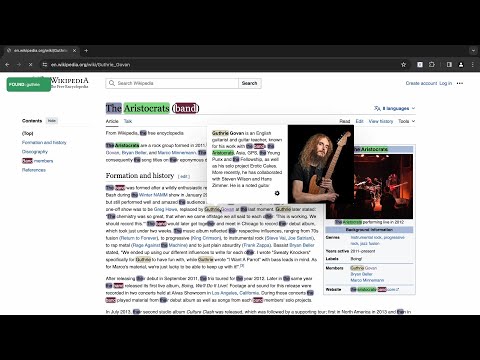
Searching and Multi Highlighting made effortless! It's the most efficient way to find and highlight any text on the web.
An easy-to-use multi finder, multi highlighter, and navigator browser extension with powerful searching functionalities to enhance your productivity across webpages and PDFs. Use numerous filtering options, set unique colors, and enjoy searches without language limits. With Highlighty, you'll get instant notifications about found or not found search queries on webpages and in selectable-text PDFs. Now also includes a dedicated PDF viewer for searching, highlighting, and navigating one or more PDFs with the same Highlighty queries, colors, and X-Ray workflow. - Privacy-first approach - No user tracking of any kind - No remotely injected code - Ad-free experience ❗ATTENTION❗ Please refresh all your currently opened webpages after installing the extension. --- ⚙️ How it works (simplest) : 1. Navigate the browser to the website/websites you wish to search on 2. Use the text field of the extension to introduce your query 3. Pay attention to the notifications shown by Highlighty 4. If the query/queries have been found, scroll through the website to see the results More information and video tutorials about the features: https://highlighty.app/how-to-use https://highlighty.app/blog ✔️ Dedicated PDF viewer for searching, highlighting, and navigating multiple selectable-text PDFs ✔️ Accessibility enhancing text decoration with colors ✔️ X-Ray shows match context in a draggable minimap for faster scanning and navigation. ✔️ Scrollbar Markers (Navigate Highlighted Content with Ease) ✔️ Adaptive text color based on WCAG 2.0 specification ✔️ Search analytics, visualisation ✔️ Bulk .xlsx (Excel, Google Sheets) file import ✔️ RegExp query toggler ✔️ Backup & restore (sync with another computer) ✔️ Sum of found queries on extension icon ✔️ Download/upload queries ✔️ Manual search mode with hotkey function ✔️ Compact list view ✔️ Highlight and search on word select ✔️ Found query font size change to 25px ✔️ Saving infinite query lists ✔️ Temporary deactivation of coloring ✔️ Focus extension input on open ✔️ Navigation custom key setup ✔️ Color picker, color palette, color randomizer ▸ Why Highlighty❓ • NO TRACKING/ANALYTICS OF ANY KIND • ADS-FREE • X-Ray adds a draggable context minimap that shows snippets around your matches, surfaces matches hidden inside collapsed sections, tabs, or layered page UI. • Instant notification about found or not found queries on any website. • Found query counter on extension badge • Quick disable matches through hotkeys • Search query by selecting element on website • Customly assigned colors for the queries with color picker • Works on dynamic (endless) pages like Facebook, LinkedIn, Reddit, etc. It's automatically searching for new queries • Unlimited queries • Many filtering features. (Diacritic sensitivity, Case sensitivity, find only Complete words, etc.) • Full compliance with privacy and data security • Website whitelist and blacklist for limiting the extension's scope. • Multiple saved query lists • A highly flexible tool. All the settings are optional, you can turn every function off anytime you wish to • Quick-find function achieved by keyboard buttons. The extension will scroll to the found queries on the currently active website • An easy-to-use, friendly interface makes searching a pleasure ------------------- ▸ Scanning big webpages with excessive amount of queries, is a CPU intensive task. Older computers may lag if multiple tabs are open at the same time. 📨 Info / Contact Us: hey@highlighty.app - Send your requests and bug reports here. We appreciate your contribution! ▸ Tutorials: https://highlighty.app/how-to-use ▸ FAQs: https://highlighty.app/faq ▸ Privacy Policy: https://highlighty.app/privacy ▸ Terms of Service: https://highlighty.app/terms
4 星(5 星制)60 个评分
详情
隐私权

“Highlighty: Search, Find, Multi Highlight”已就收集和使用用户数据披露了以下信息。 如需了解详情,请查看开发者的privacy policy。
Highlighty: Search, Find, Multi Highlight会处理以下数据:
该开发者已声明,您的数据:
- 不会因未获批准的用途出售给第三方
- 不会为实现与产品核心功能无关的目的而使用或转移
- 不会为确定信用度或放贷目的而使用或转移
支持
若有任何疑问、建议或问题,请在桌面浏览器中打开此页面