

Highlighty: Search, Find, Multi Highlight

Tổng quan
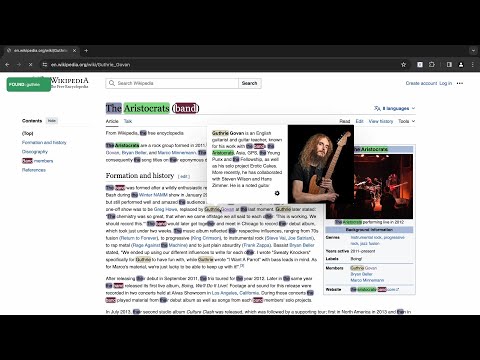
Searching and Multi Highlighting made effortless! It's the most efficient way to find and highlight any text on the web.
An easy-to-use multi finder, multi highlighter, and navigator browser extension with powerful searching functionalities to enhance your productivity. Use numerous filtering options, set unique colors, and enjoy searches without language limits. With Highlighty, you'll get instant notifications about the found or not found search queries on every webpage you search on. - Privacy-first approach - No user tracking of any kind - No remotely injected code - Ad-free experience ❗ATTENTION❗ Please refresh all your currently opened webpages after installing the extension. --- ⚙️ How it works (simplest) : 1. Navigate the browser to the website/websites you wish to search on 2. Use the text field of the extension to introduce your query 3. Pay attention to the notifications shown by Highlighty 4. If the query/queries have been found, scroll through the website to see the results More information and video tutorials about the features: https://highlighty.app/how-to-use https://highlighty.app/blog ✔️ Accessibility enhancing text decoration with colors ✔️ X-Ray shows match context in a draggable minimap for faster scanning and navigation. ✔️ Scrollbar Markers (Navigate Highlighted Content with Ease) ✔️ Adaptive text color based on WCAG 2.0 specification ✔️ Search analytics, visualisation ✔️ Bulk .xlsx (Excel, Google Sheets) file import ✔️ RegExp query toggler ✔️ Backup & restore (sync with another computer) ✔️ Sum of found queries on extension icon ✔️ Download/upload queries ✔️ Manual search mode with hotkey function ✔️ Compact list view ✔️ Highlight and search on word select ✔️ Found query font size change to 25px ✔️ Saving infinite query lists ✔️ Temporary deactivation of coloring ✔️ Focus extension input on open ✔️ Navigation custom key setup ✔️ Color picker, color palette, color randomizer ▸ Why Highlighty❓ • NO TRACKING/ANALYTICS OF ANY KIND • ADS-FREE • X-Ray adds a draggable context minimap that shows snippets around your matches, surfaces matches hidden inside collapsed sections, tabs, or layered page UI. • Instant notification about found or not found queries on any website. • Found query counter on extension badge • Quick disable matches through hotkeys • Search query by selecting element on website • Customly assigned colors for the queries with color picker • Works on dynamic (endless) pages like Facebook, LinkedIn, Reddit, etc. It's automatically searching for new queries • Unlimited queries • Many filtering features. (Diacritic sensitivity, Case sensitivity, find only Complete words, etc.) • Full compliance with privacy and data security • Website whitelist and blacklist for limiting the extension's scope. • Multiple saved query lists • A highly flexible tool. All the settings are optional, you can turn every function off anytime you wish to • Quick-find function achieved by keyboard buttons. The extension will scroll to the found queries on the currently active website • An easy-to-use, friendly interface makes searching a pleasure ------------------- ▸ Scanning big webpages with excessive amount of queries, is a CPU intensive task. Older computers may lag if multiple tabs are open at the same time. 📨 Info / Contact Us: hey@highlighty.app - Send your requests and bug reports here. We appreciate your contribution! ▸ Tutorials: https://highlighty.app/how-to-use ▸ FAQs: https://highlighty.app/faq ▸ Privacy Policy: https://highlighty.app/privacy ▸ Terms of Service: https://highlighty.app/terms
4/560 lượt xếp hạng
Chi tiết
- Phiên bản2.3.9
- Đã cập nhật28 tháng 3, 2026
- Tính năngCung cấp tính năng mua trong ứng dụng
- Kích thước5.63MiB
- Ngôn ngữEnglish
- Nhà phát triểnWEBMIND TECHNOLOGIES SRLTrang web
Strada Republicii 112 SALONTA, Bihor 415500 ROEmail
hey@highlighty.appĐiện thoại
+40 770 815 572 - Người bán thương mạiTheo định nghĩa của Liên minh Châu Âu, nhà phát triển này đã tự nhận mình là người bán và cam kết chỉ cung cấp những sản phẩm hoặc dịch vụ tuân thủ luật pháp của Liên minh Châu Âu.
- D-U-N-S599927116
Quyền riêng tư

Highlighty: Search, Find, Multi Highlight đã công bố thông tin sau đây liên quan đến việc thu thập và sử dụng dữ liệu của bạn. Bạn có thể xem thêm thông tin chi tiết trong privacy policy của nhà phát triển.
Highlighty: Search, Find, Multi Highlight xử lý dữ liệu sau:
Nhà phát triển này tuyên bố rằng dữ liệu của bạn
- Không được bán cho bên thứ ba, ngoài những trường hợp sử dụng đã được phê duyệt
- Không được sử dụng hoặc chuyển nhượng cho các mục đích không liên quan đến chức năng chính của mặt hàng
- Không được sử dụng hoặc chuyển nhượng để xác định khả năng thanh toán nợ hoặc phục vụ mục đích cho vay
Hỗ trợ
Nếu bạn có câu hỏi, ý kiến đề xuất hoặc gặp vấn đề, vui lòng mở trang này bằng trình duyệt dành cho máy tính để được trợ giúp