


개요
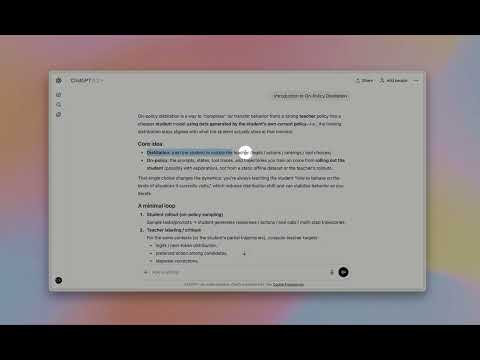
Highlight text in ChatGPT to instantly ask questions, explain concepts, and translate — no copy & paste.
HighlightGPT lets you highlight text in ChatGPT to instantly ask questions, explain concepts, translate text, and save notes — without copy and paste. This Chrome extension adds a smart highlight toolbar inside ChatGPT, turning any selected text into instant AI actions: - Ask questions about the highlighted snippet - Explain concepts in plain language (or in-depth) - Translate while preserving tone and nuance - Save key points for later reference using ChatGPT’s built-in features. Why you’ll love it: - One-tap from highlight → answer: no copy/paste, no extra prompts. - Context stays on screen: answers appear in a slim side panel, so you keep reading without losing your place. - 0 extra tokens: works directly inside ChatGPT’s native web experience — no separate model or token billing. - Privacy-first: answers are generated by ChatGPT only. Best for: - Students and researchers using ChatGPT for explanations and summaries - Reading long articles in ChatGPT with quick text explanations - Translating highlighted text in ChatGPT with consistent tone - Saving important highlights to ChatGPT Memory Install for free, upgrade anytime for Lifetime Pro (remove ads, unlimited memory saves, priority support, early access).
5점 만점에 5점평점 2개
세부정보
개인정보 보호

개발자가 사용자 데이터에 관해 다음과 같이 선언했습니다
- 승인된 사용 사례를 제외하고 서드 파티에 판매하지 않음
- 항목의 핵심 기능과 관련 없는 목적으로 사용하거나 전송하지 않음
- 신용도 판단 또는 대출 목적으로 사용하거나 전송하지 않음
지원
질문, 제안 또는 문제와 관련하여 도움이 필요하시면 개발자의 지원 사이트를 방문하세요.