Item logo image for HighlightGPT – Highlight Text to Ask & Explain in ChatGPT

HighlightGPT – Highlight Text to Ask & Explain in ChatGPT

Featured
5.0(

2 ratings

)
Item media 4 (screenshot) for HighlightGPT – Highlight Text to Ask & Explain in ChatGPT
Item media 5 (screenshot) for HighlightGPT – Highlight Text to Ask & Explain in ChatGPT
Item media 1 (screenshot) for HighlightGPT – Highlight Text to Ask & Explain in ChatGPT
Item media 2 (screenshot) for HighlightGPT – Highlight Text to Ask & Explain in ChatGPT
Item media 3 (screenshot) for HighlightGPT – Highlight Text to Ask & Explain in ChatGPT
Item media 4 (screenshot) for HighlightGPT – Highlight Text to Ask & Explain in ChatGPT
Item media 5 (screenshot) for HighlightGPT – Highlight Text to Ask & Explain in ChatGPT
Item media 1 (screenshot) for HighlightGPT – Highlight Text to Ask & Explain in ChatGPT
Item media 2 (screenshot) for HighlightGPT – Highlight Text to Ask & Explain in ChatGPT
Item media 1 (screenshot) for HighlightGPT – Highlight Text to Ask & Explain in ChatGPT
Item media 2 (screenshot) for HighlightGPT – Highlight Text to Ask & Explain in ChatGPT
Item media 3 (screenshot) for HighlightGPT – Highlight Text to Ask & Explain in ChatGPT
Item media 4 (screenshot) for HighlightGPT – Highlight Text to Ask & Explain in ChatGPT
Item media 5 (screenshot) for HighlightGPT – Highlight Text to Ask & Explain in ChatGPT

Overview

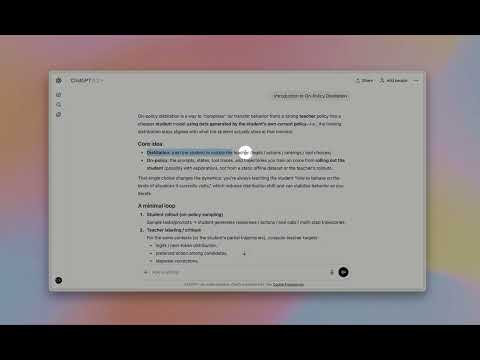
Highlight text in ChatGPT to instantly ask questions, explain concepts, and translate — no copy & paste.

HighlightGPT lets you highlight text in ChatGPT to instantly ask questions, explain concepts, translate text, and save notes — without copy and paste. This Chrome extension adds a smart highlight toolbar inside ChatGPT, turning any selected text into instant AI actions: - Ask questions about the highlighted snippet - Explain concepts in plain language (or in-depth) - Translate while preserving tone and nuance - Save key points for later reference using ChatGPT’s built-in features. Why you’ll love it: - One-tap from highlight → answer: no copy/paste, no extra prompts. - Context stays on screen: answers appear in a slim side panel, so you keep reading without losing your place. - 0 extra tokens: works directly inside ChatGPT’s native web experience — no separate model or token billing. - Privacy-first: answers are generated by ChatGPT only. Best for: - Students and researchers using ChatGPT for explanations and summaries - Reading long articles in ChatGPT with quick text explanations - Translating highlighted text in ChatGPT with consistent tone - Saving important highlights to ChatGPT Memory Install for free, upgrade anytime for Lifetime Pro (remove ads, unlimited memory saves, priority support, early access).

Details

  • Version
    1.0.2
  • Updated
    January 20, 2026
  • Size
    2.78MiB
  • Languages
    English
  • Developer
    Website
    Email
    zhongxin123456@gmail.com
  • Non-trader
    This developer has not identified itself as a trader. For consumers in the European Union, please note that consumer rights do not apply to contracts between you and this developer.

Privacy

The developer has disclosed that it will not collect or use your data. To learn more, see the developer’s privacy policy.

This developer declares that your data is

  • Not being sold to third parties, outside of the approved use cases
  • Not being used or transferred for purposes that are unrelated to the item's core functionality
  • Not being used or transferred to determine creditworthiness or for lending purposes

Support

For help with questions, suggestions, or problems, visit the developer's support site

Related

Side Space - AI Agent: Research, Summarize, Organize & Automate

4.2

AI Agent takes action for you: manage tabs & windows, automate tasks, summarize & research. Arc-style vertical tabs sidebar.

MiroMiro

5.0

Inspect any website and extract its design elements: CSS, colors, fonts, spacing, SVGs, and Lottie animations without DevTools.

Save to Beloga

3.0

Beloga quick capture extension.

PrettyPrompt

4.9

A browser extension to help refine and optimize prompts

Dokkio Sidebar

4.9

Integrate your digital life - web pages & apps, content, files, and messages.

remio | #1 AI Assistant Powered by Your Experience

4.8

remio is your copilot to chat with your digital memory, get 1-click summaries and collect webpages without leaving your tab.

Prompt Enhancer & Chat Navigator

4.9

Enhance prompts and navigate chat history on AI platforms.

Fabric web clipper – save anything from the web

4.6

🍱 All your stuff in one place. 👋 Collaborate on anything.

2-b.ai - AI To-Do List & Smart Task Manager

4.8

Turn any web text into a task with a simple highlight. The AI productivity tool that assists you from planning to execution.

SaveDay - AI Bookmark Manager

4.7

AI knowledge assistant helps you instantly save, highlight web content, annotate and retrieve them

MyLens: Your AI Visualization Partner

4.6

Wherever you're on the web—YouTube, websites, docs—click MyLens to analyze content and turn it into AI source-linked visualizations.

HighlightGPT

5.0

Explain selected text in seconds using context from any page!

Side Space - AI Agent: Research, Summarize, Organize & Automate

4.2

AI Agent takes action for you: manage tabs & windows, automate tasks, summarize & research. Arc-style vertical tabs sidebar.

MiroMiro

5.0

Inspect any website and extract its design elements: CSS, colors, fonts, spacing, SVGs, and Lottie animations without DevTools.

Save to Beloga

3.0

Beloga quick capture extension.

PrettyPrompt

4.9

A browser extension to help refine and optimize prompts

Dokkio Sidebar

4.9

Integrate your digital life - web pages & apps, content, files, and messages.

remio | #1 AI Assistant Powered by Your Experience

4.8

remio is your copilot to chat with your digital memory, get 1-click summaries and collect webpages without leaving your tab.

Prompt Enhancer & Chat Navigator

4.9

Enhance prompts and navigate chat history on AI platforms.

Fabric web clipper – save anything from the web

4.6

🍱 All your stuff in one place. 👋 Collaborate on anything.

Google apps