

Highlighter Pen - Web Annotation & Screenshot Feedback

Overview
Annotate any webpage with highlights, notes, arrows, and screenshots. Turn reviews, bugs, and feedback into shareable exports.
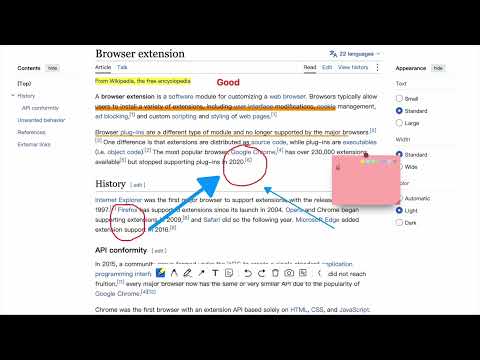
Annotate any webpage, capture clear screenshots, and turn online reviews into actionable feedback. Highlighter Pen helps you mark up webpages directly in your browser. Highlight important text, add sticky notes, place text boxes, draw arrows, and capture annotated screenshots without switching tools or leaving the current tab. Use it to review websites, report bugs, collect research notes, explain design changes, and share page feedback with teammates or clients. Key Features: ✔ Highlight selected text with one click ✔ Add sticky notes for comments and reminders ✔ Place text boxes anywhere on the page ✔ Draw arrows to point out issues or important areas ✔ Capture and share annotated screenshots ✔ Turn webpage feedback into clearer, faster communication
5 out of 51 rating
Details
- Version0.0.8
- UpdatedOctober 27, 2026
- Size810KiB
- Languages12 languages
- Developer
- Non-traderThis developer has not identified itself as a trader. For consumers in the European Union, please note that consumer rights do not apply to contracts between you and this developer.
Privacy

This developer declares that your data is
- Not being sold to third parties, outside of the approved use cases
- Not being used or transferred for purposes that are unrelated to the item's core functionality
- Not being used or transferred to determine creditworthiness or for lending purposes
Support
For help with questions, suggestions, or problems, please open this page on your desktop browser