

highlight2calendar: Text to Google Calendar & Tasks (AI)

Overview
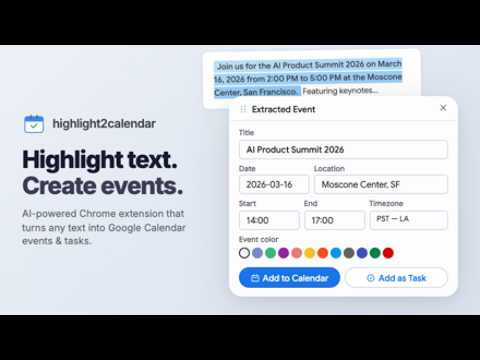
Turn highlighted text into Google Calendar events or Tasks with AI. Dates, times and locations extracted from any page.
Stop retyping event details. Highlight text on any webpage (an email, a club announcement, a group chat, an event page) and highlight2calendar turns it into a Google Calendar event or Google Task in one click. HOW IT WORKS 1. Select the text that mentions an event or deadline. 2. Click the floating button next to your selection (or right-click → highlight2calendar). 3. AI extracts the title, date, start/end time, location, and description. Review, edit anything, and save. WHAT IT HANDLES • Relative dates like "tomorrow at 5" or "next Friday", resolved in your timezone • Ambiguous formats (3/4, "noon", date ranges) • Google Calendar events AND Google Tasks (great for deadlines) • Any webpage: Gmail, Outlook web, Discord, Slack, news sites, event pages FAST AND PRIVATE • Loads nothing on pages until you actually use it • Only the text you select is sent for extraction, never the page • Your Google account connects through Google's official sign-in; events are written directly to your calendar Perfect for students juggling club announcements and assignment deadlines, and for anyone whose plans arrive as plain text.
5 out of 510 ratings
Details
- Version1.2.0
- UpdatedSeptember 6, 2026
- Size153KiB
- LanguagesEnglish (United States)
- DeveloperWebsite
Email
zatekpiotr@gmail.com - Non-traderThis developer has not identified itself as a trader. For consumers in the European Union, please note that consumer rights do not apply to contracts between you and this developer.
Privacy

highlight2calendar: Text to Google Calendar & Tasks (AI) has disclosed the following information regarding the collection and usage of your data. More detailed information can be found in the developer's privacy policy.
highlight2calendar: Text to Google Calendar & Tasks (AI) handles the following:
This developer declares that your data is
- Not being sold to third parties, outside of the approved use cases
- Not being used or transferred for purposes that are unrelated to the item's core functionality
- Not being used or transferred to determine creditworthiness or for lending purposes
Support
For help with questions, suggestions, or problems, visit the developer's support site