

Highlight occurrences of the selected text
3 ratings
)
Overview
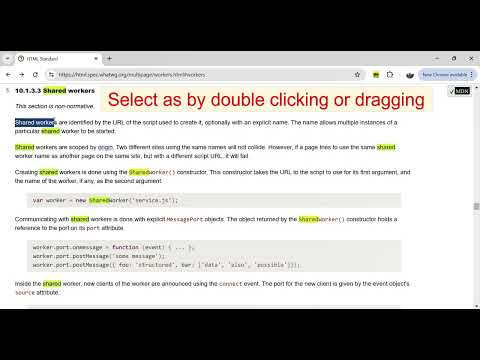
Double click a word to highlight all its occurrences in the web page. Highlight all instances of selected expression in the web page
Double click a word and see all its occurrences highlighted like it happens in code editors. Or select a text fragment to highlight all instances of the selected string in the web page. The highlights remains until another text fragment is selected. Press ESC to cancel highlighting of the last selected string. The extension detects and highlights every instance of the selected text string within the webpage regardless of selection method - dragging, double clicking or using the keyboard. The result is almost the same as if you select some text, copy it and paste into the standard Ctrl+F search box. The matches within the web page get highlighted. The extension monitors the page for changes, e.g. during infinite scrolling, and highlights the selected text in the gradually loaded contents. The extension does not need any configuration - to activate the extension click its icon. To respect you privacy the extension is deactivated after any navigation. Click the icon again to activate the extension. The highlight color can be selected in the options The extension is free and open source
4.7 out of 53 ratings
Details
- Version0.0.10
- UpdatedAugust 5, 2025
- Offered bymarian.caikovski
- Size28.35KiB
- LanguagesEnglish
- Developer
Email
marian.caikovski@gmail.com - Non-traderThis developer has not identified itself as a trader. For consumers in the European Union, please note that consumer rights do not apply to contracts between you and this developer.
Privacy

This developer declares that your data is
- Not being sold to third parties, outside of the approved use cases
- Not being used or transferred for purposes that are unrelated to the item's core functionality
- Not being used or transferred to determine creditworthiness or for lending purposes
Support
For help with questions, suggestions, or problems, please open this page on your desktop browser