

Highlight Emails in Gmail by cloudHQ

Descripción general
Highlight Email Rows in Gmail
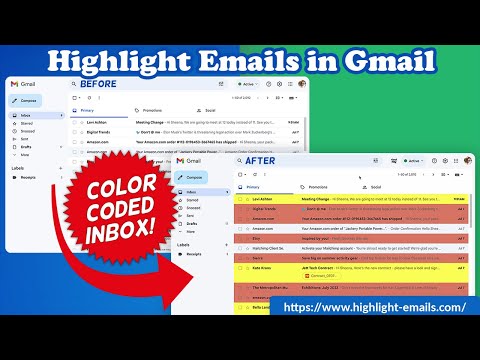
Color code email rows in Gmail to visually organize them. ✅ Select from a choice of calming or bright colors. ✅ Adjust background color based on email status, such as read/unread or selected. ✅ Customize the background color highlight depending on the sender’s email domain. ✅ Focus mode minimizes distractions, specifically designed to assist individuals with neurodevelopmental disorders to more easily navigate, read, and concentrate. In short, with this extension you can inbox customization through color-coding, allowing users to visually categorize emails. For example, assigning the color red to emails from security domains like security@google.com enhances the ability to quickly spot and prioritize critical alerts or notifications, streamlining inbox management and efficiency. Imagine having all your emails from clients, vendors, or internal company emails neatly color-highlighted. It's like having a personalized filing system right in your inbox. You'll easily spot emails that need your attention, while also decluttering your digital workspace. This is a game changer for anyone dealing with heaps of emails daily. This app isn't just about managing your inbox; it's about managing your time and focus too. There's even a unique "Focus Mode" that works when you hover over an email. That email stands out while everything else recedes into the background. All other emails gray out, removing distractions and letting you zero in on that single email. It's the visual equivalent of noise-canceling headphones for your inbox. This way, you can devote your full attention to each email in turn, without missing any important details. Perfect for anyone who needs a little help focusing amidst the constant barrage of incoming emails. Focus Mode is more than a feature, it's a way to reclaim control over your digital environment. ~~~~ Instructions for Use ~~~~ 1. Install the extension. 2. You can get started now by clicking on: - The cloudHQ log on the top of your Gmail inbox - Click on "Highlight Emails" - Click on "Highlight Rows (ON/OFF)" to toggle the feature on and off 3. To activate the "Focus Mode," just toggle "Reading Focus (ON/OFF)" to enable distraction-free reading. 4. To disable, toggle the feature off. cloudHQ website: https://www.cloudhq.net/ App website: https://www.highlight-emails.com Pricing: https://www.highlight-emails.com/pricing Support page: https://support.cloudhq.net/category/browser-extensions/highlight-emails/ FAQ page: https://support.cloudhq.net/highlight-emails-faq-frequently-asked-questions/ Blog: https://blog.cloudhq.net Gmail, Google Calendar, and Google Workspace are trademarks of Google LLC. Use of these trademarks is subject to Google Permissions. cloudHQ is trademark of cloudHQ LLC. https://www.cloudhq.net/trademark
3,9 de 510 valoraciones
Detalles
- Versión1.0.1.23
- Actualizado15 de diciembre de 2025
- Tamaño1.23MiB
- IdiomasEnglish
- DesarrolladorcloudHQ LLCSitio web
2247 29th Ave San Francisco, CA 94116-1738 USCorreo electrónico
support@cloudhq.netTeléfono
+1 415-509-6721 - OperadorEste desarrollador se ha identificado como operador según la definición de la Unión Europea y se ha comprometido a ofrecer solo productos o servicios que cumplan las leyes de la UE.
- D-U-N-S064785518
Privacidad

Highlight Emails in Gmail by cloudHQ ha revelado la siguiente información sobre la recogida y el uso de tus datos. Puedes consultar información más detallada en la privacy policy del desarrollador.
Highlight Emails in Gmail by cloudHQ gestiona lo siguiente:
Este desarrollador declara que tus datos:
- No se venden a terceros, excepto en los casos de uso aprobados
- No se usan ni se transfieren para fines no relacionados con la función principal del elemento.
- No se usan ni se transfieren para determinar la situación crediticia ni para ofrecer préstamos.
Ayuda
Si tienes alguna pregunta, sugerencia o problema, visita el sitio de asistencia del desarrollador.