Item logo image for Highlight By ChatGPT

Highlight By ChatGPT

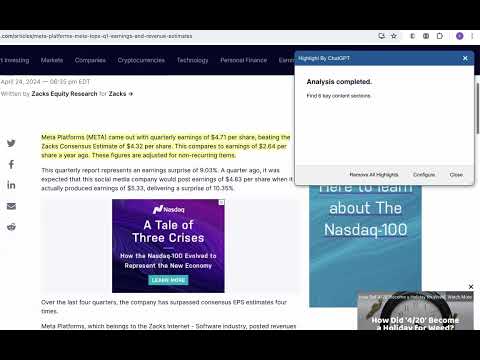
Item media 6 (screenshot) for Highlight By ChatGPT
Item video thumbnail
Item media 2 (screenshot) for Highlight By ChatGPT
Item media 3 (screenshot) for Highlight By ChatGPT
Item media 4 (screenshot) for Highlight By ChatGPT
Item media 5 (screenshot) for Highlight By ChatGPT
Item media 6 (screenshot) for Highlight By ChatGPT
Item video thumbnail
Item media 2 (screenshot) for Highlight By ChatGPT
Item media 3 (screenshot) for Highlight By ChatGPT
Item media 4 (screenshot) for Highlight By ChatGPT
Item media 5 (screenshot) for Highlight By ChatGPT
Item media 6 (screenshot) for Highlight By ChatGPT

Overview

Using the ChatGPT LLM AI tool, important content on web pages is identified and highlighted.

1. Utilize the ChatGPT LLM AI tool to analyze web page content. 2.Examine the text structure of the webpage, identify the main themes, and compile them into a list for analysis by ChatGPT. 3. ChatGPT will evaluate the submitted list, integrating it with the article's context, and will allocate a score to each section. 4. Scores range from 0 to 10, with higher scores indicating greater significance. 5. Following the analysis, highlight sections on the webpage that receive scores above 6. 6. Once highlighted, you have the option to remove these highlights if needed.

Details

  • Version
    1.0
  • Updated
    April 26, 2024
  • Offered by
    Danny
  • Size
    115KiB
  • Languages
    English
  • Developer
    Email
    dannyzhu@gmail.com
  • Non-trader
    This developer has not identified itself as a trader. For consumers in the European Union, please note that consumer rights do not apply to contracts between you and this developer.

Privacy

The developer has disclosed that it will not collect or use your data.

This developer declares that your data is

  • Not being sold to third parties, outside of the approved use cases
  • Not being used or transferred for purposes that are unrelated to the item's core functionality
  • Not being used or transferred to determine creditworthiness or for lending purposes

Support

Related

Gizmo: Code Editor and Preview Tool

5.0

Gizmo is a Chrome sidePanel web code editor and preview tool.

Highlighter

3.7

Highlight text on websites with a simple right-click or keyboard shortcut. Saves highlights on your device.

HighlightAI

5.0

Chat on highlighted cell number on Whatsapp. Search highlighted text on FB, LinkedIn, X, Quora and TikTok. Search using AI

Web Highlights: PDF & Web Highlighter + Notes & AI Summary

4.8

Productivity Highlighter & Annotation Tool for Websites & PDFs with AI Summary - free, easy to use, no sign-up required.

ChatGPT to PDF by PDFCrowd

4.7

Turn your chats into neatly formatted PDF.

ChatGPT Code Highlighter

4.9

Improve the appearance of code snippets in ChatGPT code snippets.

Highlight AI: Chat with your tabs

4.8

Chat with your tabs, take meeting notes, and get stuff done.

Ask Your Text

4.7

Right-click to ask AI about highlighted text

Ask Chat GPT Extension

0.0

Ask Chat GPT about highlighted text

Select to AI

3.5

Send selected text to ChatGPT, Gemini, or Perplexity via New Tab, Popup Window, or Side Panel.

Highlights AI: Simplify reading with ChatGPT

5.0

Ask questions and gain insights from a page with contextually relevant AI anwsers.

ChatGPT Search - Highlight Any Text

0.0

Send any text directly to ChatGPT as a prompt. Highlight, right-click, and select ChatGPT Search.

Gizmo: Code Editor and Preview Tool

5.0

Gizmo is a Chrome sidePanel web code editor and preview tool.

Highlighter

3.7

Highlight text on websites with a simple right-click or keyboard shortcut. Saves highlights on your device.

HighlightAI

5.0

Chat on highlighted cell number on Whatsapp. Search highlighted text on FB, LinkedIn, X, Quora and TikTok. Search using AI

Web Highlights: PDF & Web Highlighter + Notes & AI Summary

4.8

Productivity Highlighter & Annotation Tool for Websites & PDFs with AI Summary - free, easy to use, no sign-up required.

ChatGPT to PDF by PDFCrowd

4.7

Turn your chats into neatly formatted PDF.

ChatGPT Code Highlighter

4.9

Improve the appearance of code snippets in ChatGPT code snippets.

Highlight AI: Chat with your tabs

4.8

Chat with your tabs, take meeting notes, and get stuff done.

Ask Your Text

4.7

Right-click to ask AI about highlighted text

Google apps