


Présentation
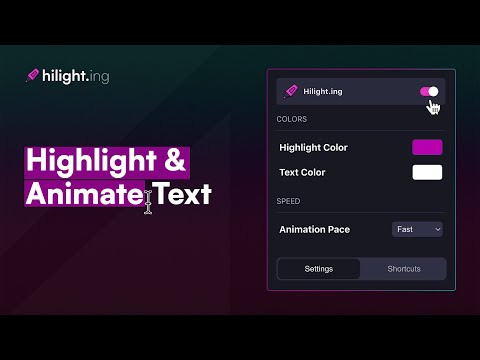
Creating animated text highlights on web pages.
Designed for content creators, educators, and anyone looking to bring a dynamic edge to their web browsing experience. Our extension offers a unique way to animate text highlights on web pages, making it an indispensable tool for screen recordings, presentations, and educational content. # Key Features: 1. Dynamic Text Highlighting: - Seamlessly highlight text on any webpage. - Bring attention to specific sections of content, perfect for tutorials, guides, and online teaching. 2. Customizable Animation Pace: - Choose from three animation paces: slow, moderate, and fast. - Tailor the speed of the highlight animation to match the context and tone of your content. 3. Color Customization: - Personalize your highlights with a spectrum of background and text colors. - Adapt the look to fit your brand, mood, or the specific needs of your content. 4. Intuitive Shortcuts: - Quick keyboard shortcuts to clear highlights, restart animations, and toggle highlighting functionality. - Enhance your workflow efficiency without breaking your focus. 5. User-Friendly Interface: - A clean, straightforward popup interface for easy access to all features. - No steep learning curve – start enhancing your content right away. # Ideal Use Cases: - Content Creation: Add a layer of engagement to your video tutorials, walkthroughs, and educational content. Highlight key information as you navigate through web pages, making your content more accessible and easier to follow. - Educational Purposes: Teachers and educators can use Hilight.ing to draw attention to important sections of online resources during virtual classes or presentations. - Professional Presentations: During web-based presentations, use Hilight.ing to guide your audience's focus, ensuring they don't miss any critical information. - Personal Browsing: Enhance your reading experience by highlighting and animating sections for personal reference or to increase focus on lengthy articles.
4 sur 56 avis
Détails
- Version0.9.1
- Dernière mise à jour27 décembre 2024
- Taille180KiB
- LanguesEnglish
- DéveloppeurQUEEZED LLCSite Web
2055 Limestone Rd STE 200-C Wilmington, DE, Wilmington, US, 19808 Wilmington, DE 19808 USE-mail
divize.input.output@gmail.com - Non-professionnelCe développeur ne s'est pas identifié comme professionnel. Pour les consommateurs de l'Union européenne, veuillez noter qu'il est possible que les droits des consommateurs ne s'appliquent pas aux contrats entre vous et ce développeur.
Confidentialité

Ce développeur déclare que vos données :
- Ne seront pas vendues à des tiers en dehors des cas d'utilisation approuvés.
- Ne seront ni utilisées ni transférées à des fins sans rapport avec la fonctionnalité de base de l'article.
- Ne seront ni utilisées ni transférées pour déterminer votre solvabilité ou en vue de vous proposer un prêt.