


Overview
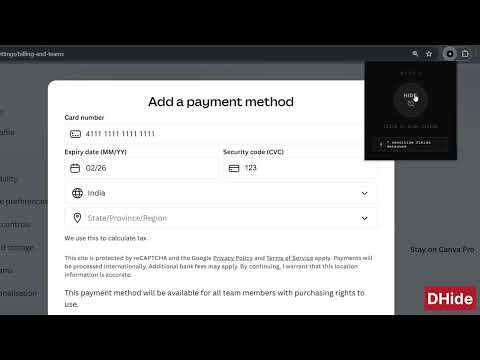
Blurs form fields and sensitive data on webpages to keep information private while browsing.
DHide – Protect Your On-Screen Privacy Entering sensitive information online is common credit card numbers, bank details, personal data, account credentials, government IDs, and more. But not every website protects what you type. While some banking and government websites automatically hide or mask sensitive inputs, many other websites display everything clearly as you type. If you are working in a public place a cafe, office, airport, classroom, or shared workspace, anyone nearby can easily see your information on screen. DHide helps solve this privacy problem. The Problem # When you enter sensitive information: # People standing behind you can see it. # Screens in public places are easily exposed. # Screen recordings or screen sharing can reveal private details. # Many websites do not mask sensitive inputs by default. # Even if you trust the website, your physical surroundings may not be private. How DHide Helps ? DHide adds an instant privacy layer to any webpage. With a single click, it: # Blurs input fields # Blurs textareas # Blurs dropdown selections # Blurs editable form areas # Detects dynamically loaded form fields # Works on modern web applications #It does this using a visual blur effect. your data is not modified, stored, or transmitted. Forms continue to work normally. Submissions are unaffected. #You can toggle it on when needed and turn it off anytime. Why Install DHide ? #Protect your privacy in public places #Prevent shoulder surfing #Reduce risk during screen sharing #Add masking to websites that do not provide it #Stay safe when entering personal details outside secure environments #DHide works locally in your browser and does not collect or track any data. Privacy First DHide: # Does not read or store your input values # Does not transmit any data # Does not interfere with form submissions # Runs entirely inside your browser # It simply adds a visual blur layer for added protection.
5 out of 54 ratings
Details
- Version1.0.1
- UpdatedFebruary 27, 2026
- Size11.15KiB
- LanguagesEnglish
- DeveloperWebsite
Email
yugeshweb@gmail.com - Non-traderThis developer has not identified itself as a trader. For consumers in the European Union, please note that consumer rights do not apply to contracts between you and this developer.
Privacy

This developer declares that your data is
- Not being sold to third parties, outside of the approved use cases
- Not being used or transferred for purposes that are unrelated to the item's core functionality
- Not being used or transferred to determine creditworthiness or for lending purposes