

Hide Shorts, Reels, Stories & More – Distraction Blocker

Overview
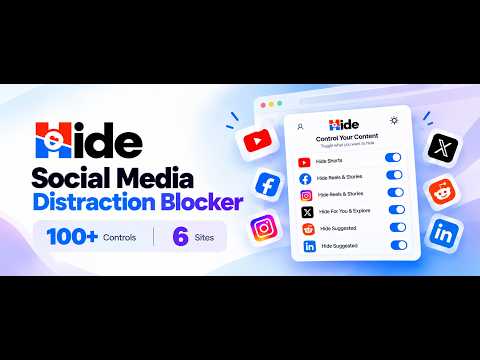
Hide Shorts, Reels, Stories, Sponsored & Explore on YouTube, Facebook, Instagram, X and Reddit — and 100+ more controls.
TAKE CONTROL OF YOUR SOCIAL MEDIA Reduce distractions without blocking the websites you still need. Hide lets you remove distracting short-form videos, Stories, and other content from your browsing experience. Start with simple controls, keep the content you need, and customize more when you want greater control. CORE FEATURES Facebook - Hide Reels and Stories. - Hide distracting videos. - Hide Sponsored posts and Ads. Instagram - Hide Reels and Stories. - Hide Explore links and content. YouTube - Hide Shorts from the homepage, feed, and navigation. Choose what you want to hide without blocking the entire platform. SIMPLE BY DEFAULT. MORE CONTROL WHEN YOU NEED IT. Start with Hide's core filters. For a more customized browsing experience, open Control more from the popup to access 100+ additional switches across supported sites, including X and Reddit. - Hide comments, recommendations, side panels, counts, menus, and other page elements. - Choose presets such as Just the video and No numbers. - Search and group switches to find settings quickly. - Export and import your settings. - Stop autoplay or blur thumbnails. - Turn a site grey. - Start on Subscriptions or Following instead of the home feed, where supported. Every additional switch starts off. You decide which options to enable, so you can keep your setup as simple or as customized as you prefer. SMART FILTERING - Hidden videos are paused to prevent continued background audio. - Hidden Instagram Reels and Stories become compact placeholders to help preserve feed scrolling. - Supported hidden-content links redirect to the platform's homepage. FREE AND PRO Free - Access to the core filters. - Unlimited filter changes during the first 7 days. - Up to 3 filter changes per day after the first 7 days. - A small popup ad and up to two partner or sponsor placements. Pro - Unlimited filter changes. - Full per-toggle control. - A popup without ads or sponsor placements. Core filters remain functional on the free plan. Sponsored & Ads is disabled by default and can be enabled when you want it. DESIGNED FOR FOCUS Use Hide to create a browsing experience that better supports studying, working, or other activities that require concentration. - Reduce distractions from short-form content. - Spend less time in endless scrolling loops. - Keep the parts of each platform you still use. - Customize your experience with straightforward controls or advanced settings. YOUR PRIVACY MATTERS Hide does not track your browsing activity, record the pages you visit or content you view, follow you across websites, or sell your data. Your filter settings are stored on your device and are not sent to us. Free accounts send a random installation ID to our server to check the account plan. This ID is not linked to personal information. Pro accounts store your name and email for licence verification and support. Payments are handled by Freemius, and we do not see your card details. The free popup ad is supplied by AdsOnBread. A random token that changes every 24 hours is sent to the ad network to help prevent repeated ads. Partner and sponsor placements are fetched from our server. Pro removes ads and sponsor placements from the popup. CHANGELOG v4.0.0 - Added Control more with 100+ additional switches across supported sites, including X and Reddit. - Added more controls for page elements, presets, search, grouping, and settings export/import. - Added options for autoplay, thumbnail blurring, grayscale appearance, and supported feed-start preferences. v3.3.1 - Updated ad placements. v3.3.0 - Refined the popup layout and rewards panel. - Improved interface consistency across supported languages. v3.2.0 - Expanded language support to 50 locales. - Improved right-to-left layouts and localization. v3.1.0 - Added Chrome internationalization infrastructure. - Expanded localized interface messages and improved locale validation. v3.0.0 - Introduced Pro with unlimited filter changes and a popup without ads or sponsor placements. - Added the Free plan's 7-day unrestricted change period, followed by 3 filter changes per day. - Improved filtering reliability and redesigned the popup. v2.4 - Improved hiding of sponsored content in the feed and sidebar. - Added a placeholder for hidden feed ads to help preserve scrolling. - Made Sponsored & Ads opt-in by default. v2.0 - Added Instagram filtering for Reels, Stories, and Explore. - Improved feed behavior with compact placeholders. v1.0 - Initial release.
4.5 out of 5108 ratings
Details
- Version4.0.0
- UpdatedOctober 14, 2026
- Size1.18MiB
- Languages50 languages
- DeveloperWebsite
Email
itsibrahimriaz@gmail.com - Non-traderThis developer has not identified itself as a trader. For consumers in the European Union, please note that consumer rights do not apply to contracts between you and this developer.
Privacy

Hide Shorts, Reels, Stories & More – Distraction Blocker has disclosed the following information regarding the collection and usage of your data. More detailed information can be found in the developer's privacy policy.
Hide Shorts, Reels, Stories & More – Distraction Blocker handles the following:
This developer declares that your data is
- Not being sold to third parties, outside of the approved use cases
- Not being used or transferred for purposes that are unrelated to the item's core functionality
- Not being used or transferred to determine creditworthiness or for lending purposes
Support
For help with questions, suggestions, or problems, please open this page on your desktop browser