


概述
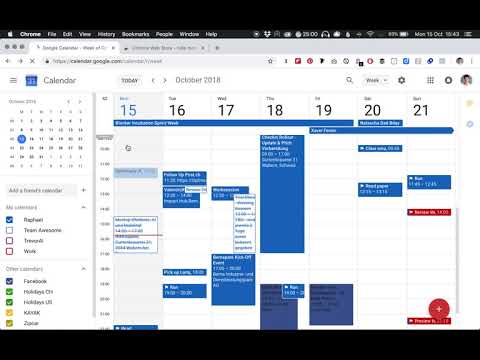
Hide morning hours on your Google Calendar to stop wasting space on your screen for empty hours.
When's the last time you had a meeting at 3am? Empty hours are irrelevant and waste space on your screen. This extension lets you minimize the range of hours in the morning on your Google Calendar, so you only see the title of events during those hours. How does it work? 1. Click “Add to Chrome” to install the extension for free from the official Chrome Web Store. 2. Reload or open your Google Calendar in Chrome: https://www.google.com/calendar 3. In the Day/Week/3 or 7 days view, you will notice a new small gray handle at the top of the times on the left. Drag it down to hide morning hours. If you want to show those hours again, simply click the gray hidden hours at the top of the times on the left. Who is it for? When you use your calendar for work or school, you can set a range of working hours in the day that fits your schedule and remove the unnecessary white space during the times you're out of office or sleeping. This extension currently works if the language of Google Calendar is set to English (US). Support for more languages coming soon. Feel free to ask us any questions or tell us what you think. Contact at www.raphaelschaad.com. Thanks for giving us a rating, if you like your clean new calendar look.
3.8 星(5 星制)131 个评分
详情
隐私权

“Hide morning in Calendar”已就收集和使用用户数据披露了以下信息。 如需了解详情,请查看开发者的privacy policy。
Hide morning in Calendar会处理以下数据:
该开发者已声明,您的数据:
- 不会因未获批准的用途出售给第三方
- 不会为实现与产品核心功能无关的目的而使用或转移
- 不会为确定信用度或放贷目的而使用或转移
支持
若有任何疑问、建议或问题,请在桌面浏览器中打开此页面