


Overview
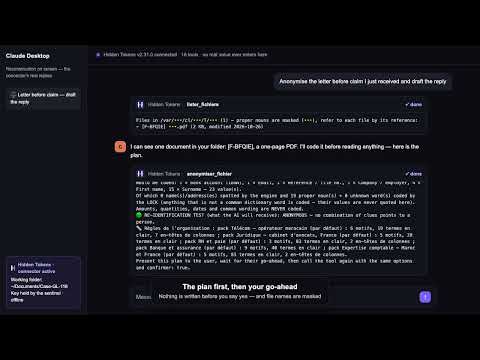
Anonymize client names and IDs before they reach AI assistants such as ChatGPT. Coded on your computer, never on a server.
Hidden Tokens replaces the names and identifiers in your message with codes, on your own computer, before an AI assistant such as ChatGPT reads it. The AI only receives the codes; its reply is translated back on your screen. It is made for people bound by confidentiality who want to use AI without handing over the personal data of their clients and staff. HOW IT WORKS 1. Write your message as usual. 2. When you send it, the Hidden Tokens app on your computer encodes it. The extension checks that the encoded text has replaced yours, then sends it. 3. Codes in the reply are shown with the real values, on your screen only. The same person keeps the same code everywhere, including in the documents the Hidden Tokens app encodes. NOTHING LEAVES IN CLEAR Once paired, if the app does not respond or a rule of your organisation holds the message, nothing is sent, and the extension tells you. NO SERVER The extension only talks to the Hidden Tokens app on your computer (127.0.0.1). It sends nothing to Hidden Tokens or anyone else, and it has no analytics and no ads. FOR IT TEAMS The extension can be force-installed and configured through Chrome enterprise policy. REQUIREMENTS The extension needs the Hidden Tokens desktop app for macOS or Windows, with a free trial at hiddentokens.com. Without it, nothing is encoded and a red banner says so. Attachments are not encoded. Hidden Tokens is not affiliated with any AI provider.
0 out of 5No ratings
Details
- Version0.26.0
- UpdatedNovember 20, 2026
- Size97.4KiB
- Languages2 languages
- DeveloperWebsite
Email
info@ai4x.academy - Non-traderThis developer has not identified itself as a trader. For consumers in the European Union, please note that consumer rights do not apply to contracts between you and this developer.
Privacy

Hidden Tokens — anonymize your AI prompts has disclosed the following information regarding the collection and usage of your data. More detailed information can be found in the developer's privacy policy.
Hidden Tokens — anonymize your AI prompts handles the following:
This developer declares that your data is
- Not being sold to third parties, outside of the approved use cases
- Not being used or transferred for purposes that are unrelated to the item's core functionality
- Not being used or transferred to determine creditworthiness or for lending purposes
Support
For help with questions, suggestions, or problems, visit the developer's support site