


Overview
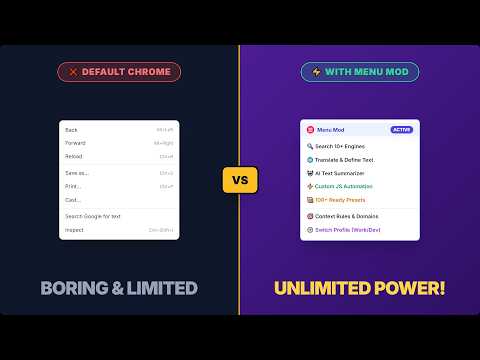
Build custom context & right-click menus. Search selected text, automate with scripts, unblock right-click and copy restrictions.
Stop copying and pasting text into new tabs. Menu Mod turns Chrome’s right-click context menu into a supercharged personal toolkit. Highlight any text, link or image to instantly search your favorite video platforms, forums, code repositories and online shops like Amazon. Run reverse image searches, translate sentences, copy formatted citations, automate multi-step tasks with JavaScript or unblock right-click restrictions on protected pages. Use one-click templates from the built-in Preset Library or design your own context menu from scratch. ──────────────────────── 🔥 POPULAR USE CASES ──────────────────────── • Multi-Engine Search: Search selected text on YouTube, forums, social networks or any custom URL in a focused or background tab. • Instant Research & Dev: Look up code errors on Stack Overflow, search open-source repositories or find academic papers. • Quick Social & Sharing: Share the current page on Facebook and other social networks or by email with title and URL pre-filled. • Media Actions: Run reverse image searches with Google Lens, download image assets or inspect video sources with one click. • Unblock Restricted Sites: Lift website blocks on right-click, text selection and copy-paste (Ctrl/Cmd+Shift+U). ──────────────────────── ⭐ KEY FEATURES ──────────────────────── 🖱️ CUSTOM CONTEXT & RIGHT-CLICK MENUS Create unlimited menu items, nested folders, submenus and separators. Set items to appear only when relevant: on selected text, links, images, videos, audio, text input fields or page backgrounds. Target specific domains using URL match patterns. 🔓 DISABLE SITE RESTRICTIONS (ALLOW RIGHT-CLICK & COPY) Encountering websites that block right-clicking or text selection? The built-in toggle temporarily disables site restrictions so you can select text, right-click and copy content freely without installing a separate extension. 🧩 DYNAMIC URL & CLIPBOARD TEMPLATES Generate dynamic URLs and clipboard content using variables: • %s (Selected text) • %url, %pageurl (Target and page URLs) • %title (Page title) • %link, %src (Clicked links and media sources) Refine data with built-in functions: $encode(), $decode(), $replace(), $toLowerCase(), $trim(), $split() and regex pattern extraction with $extract(). ⚡ JAVASCRIPT AUTOMATION & MACROS Need more than a URL? The "Run Script" action executes modern JavaScript inside an isolated Web Worker sandbox. Perform API queries via proxyFetch (CORS bypass), process text, manipulate canvas graphics, copy computed values to your clipboard, trigger downloads or chain multiple automated actions together. ⌨️ KEYBOARD SHORTCUTS & PROFILES Assign custom shortcuts to any menu item. Maintain separate profiles for Work, Personal, Development or Research and switch between them in seconds. 📚 PRESET LIBRARY Get started in seconds with ready-made presets for web search, translation, developer tools and social sharing. 💾 IMPORT, EXPORT & BACKUP Export your complete configuration as a ZIP file to sync across browsers, back up your setup or share custom workflows with your team.
4.5 out of 54 ratings
Details
- Version2.5.1
- UpdatedOctober 11, 2026
- Offered byMintonne
- Size990KiB
- Languages12 languages
- Developer
Email
exoke@pm.me - Non-traderThis developer has not identified itself as a trader. For consumers in the European Union, please note that consumer rights do not apply to contracts between you and this developer.
Privacy

Menu Mod: Right-Click & Context Menu Editor has disclosed the following information regarding the collection and usage of your data. More detailed information can be found in the developer's privacy policy.
Menu Mod: Right-Click & Context Menu Editor handles the following:
This developer declares that your data is
- Not being sold to third parties, outside of the approved use cases
- Not being used or transferred for purposes that are unrelated to the item's core functionality
- Not being used or transferred to determine creditworthiness or for lending purposes