


Overview
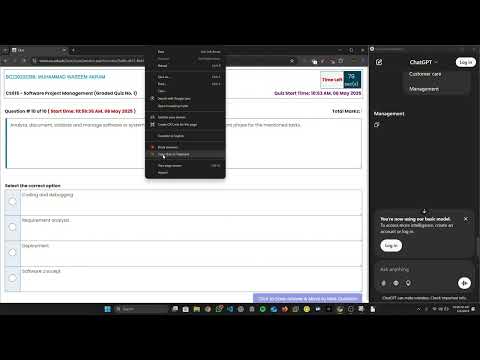
Firewall Bypass vu: copy-paste in quizzes/GDBs, mark videos watched, access ChatGPT, solve quiz with AI, generate mcqs PDF reports
Firewall Bypass vu adds study tools to the Virtual University Learning Management System (VULMS). Copy questions from supported VU quizzes, export saved MCQs as a PDF, and check assignment deadlines, results, and CGPA from the LMS. • Quiz copy and MCQ PDF export. Save copied questions and selected answers for revision. Export them as a PDF organized by course. • Activity Calendar. See upcoming quizzes, assignments, and graded discussion boards (GDBs). Check deadlines, submission status, maximum marks, and earned marks as VULMS publishes them. Connect Google Calendar if you want deadline reminders. • GPA and CGPA. Review semester performance, course grades, and credit progress. Export a PDF report. • Study resources. Find past papers, handouts, and short lecture playlists for supported courses. Check the grading scheme on course cards when VULMS provides it. • Everyday LMS tools. Use dark mode, lecture navigation, and copy and paste controls on supported quizzes, GDBs, and assignment pages. Open ChatGPT from the dock or use optional AI quiz assistance where university rules permit. After installing, open https://vulms.vu.edu.pk and sign in. Use the floating dock for page-specific tools or open Activity Calendar from the side of the VULMS home page. Saved quiz PDFs are generated in your browser. Optional AI assistance uses an external service to process the questions you send. Google Calendar sync sends deadline information to Google when you connect your account. See the Privacy section on this listing for details. Firewall Bypass vu is an independent extension for Virtual University students. Follow VU’s rules for assessments and required software. Support is available at support@wasii.dev.
4.8 out of 5217 ratings
Details
- Version3.4.17
- UpdatedNovember 16, 2026
- Size2.5MiB
- LanguagesEnglish
- DeveloperWebsite
Email
support@wasii.dev - Non-traderThis developer has not identified itself as a trader. For consumers in the European Union, please note that consumer rights do not apply to contracts between you and this developer.
Privacy

This developer declares that your data is
- Not being sold to third parties, outside of the approved use cases
- Not being used or transferred for purposes that are unrelated to the item's core functionality
- Not being used or transferred to determine creditworthiness or for lending purposes
Support
For help with questions, suggestions, or problems, please open this page on your desktop browser