

Automeda – Auto Metadata for Stock Photos
1 rating
)
Overview
AI-generated titles & keywords for Adobe Stock, Shutterstock, and other stock platforms. Save hours of tagging.
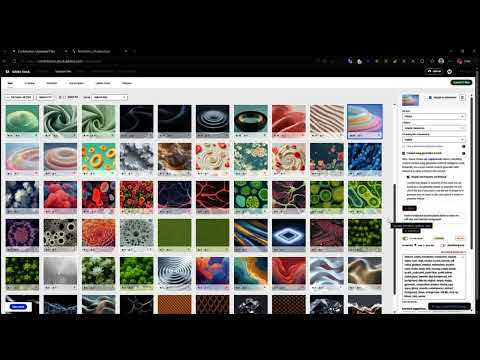
Automeda is an AI metadata generator built for stock photo, vector, and design contributors. Stop typing titles, keywords, and descriptions by hand — Automeda analyzes every image and fills in accurate, platform-ready metadata directly inside your contributor portal in seconds. Whether you're uploading 5 photos or 500, Automeda's one-click "Generate AI" button and full batch mode turn hours of manual tagging into minutes, so you can get back to shooting and submitting instead of typing keywords. Automeda currently supports six major stock contributor portals, with new platforms added regularly based on user requests — see the screenshots below for the full list. KEY FEATURES ◆ AI-generated titles, descriptions, and SEO-optimized keywords tailored to each platform's exact rules and character limits ◆ Batch mode — auto-fill an entire upload queue, up to hundreds of photos in one run ◆ Smart classification — auto-selects image/content type (Photo, Illustration, Background) and category where supported ◆ Auto-checks AI-generated content and property release fields where required ◆ Brand & trademark filtering — keeps generated metadata compliant with each platform's content policies ◆ Unique titles across a batch — avoids duplicate-sounding metadata even for visually similar photos ◆ Free plan: 5 generations per day, no credit card required ◆ Credit packs and an Unlimited Monthly plan for high-volume contributors HOW IT WORKS 1. Install Automeda and sign in with Google 2. Open your contributor portal 3. Click "Generate AI" on any photo, or run Batch Mode for your whole upload queue 4. Review the AI-filled metadata and submit — done Built for stock photographers, illustrators, and AI-image contributors who upload regularly and want more time creating and less time on repetitive metadata entry.
5 out of 51 rating
Details
- Version1.5.4
- UpdatedSeptember 12, 2026
- FeaturesOffers in-app purchases
- Offered byAutomeda
- Size102KiB
- LanguagesEnglish
- DeveloperAbdur Rahman Fadhily
Jl. Tg. Harapan Gg. Tg. Medang Tembilahan, Riau 29217 IDEmail
igimatsu@gmail.comPhone
+62 895-3301-17666 - TraderThis developer has identified itself as a trader per the definition from the European Union and committed to only offer products or services that comply with EU laws.
Privacy

Automeda – Auto Metadata for Stock Photos has disclosed the following information regarding the collection and usage of your data. More detailed information can be found in the developer's privacy policy.
Automeda – Auto Metadata for Stock Photos handles the following:
This developer declares that your data is
- Not being sold to third parties, outside of the approved use cases
- Not being used or transferred for purposes that are unrelated to the item's core functionality
- Not being used or transferred to determine creditworthiness or for lending purposes
Support
For help with questions, suggestions, or problems, visit the developer's support site