

Overview
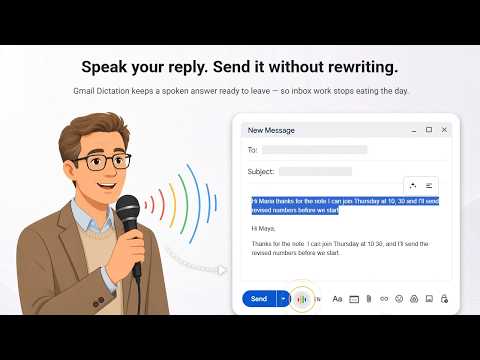
Dictation for Gmail with voice commands, correct punctuation, polishing and formatting. Commas appear as marks, not words!
🎤 Gmail Dictation is for people who answer mail in a browser and would rather speak each reply than type it. GDictate places a microphone on the open message and inside compose, then shows those words before anything goes out. ✔️ Busy inboxes get a spoken path that still lets you check tone, names, and dates. ✔️ Colleagues who live inside daily mail notice the difference by midmorning. ✅ Core features • A microphone sits beside Send and on the open message, ready when an answer is already due during live handoffs. • gmail dictation keeps a preview up before Reply or Reply all, so names, dates, amounts stay visible. • AI polishing fixes punctuation plus fillers on a selection, while meaning stays intact. • Structure splits one spoken block into paragraphs and plain lists after one monologue runs long. • Say period, new line, delete that, or scratch that while talking, plus comma, question mark, colon, semicolon. • Speech to text gmail shows inside the thread, and Gmail Dictation follows the caret in compose during ordinary weekday drafting. ⭐ Benefits Spoken replies still need one short pass so they sound human. gmail dictation lets someone talk through an answer, glance at the preview, and only then release it. That same inbox can dictate gmail without jumping into another tab, window, or separate tool. Most cleanup is light, since fillers drop, breaks appear, and meaning stays obvious. 🔍 How to dictate in gmail begins (from an open draft or fresh compose on desktop) 1. Open Gmail Web site 2. Tap the microphone beside Send, else press Alt+Z. Hold that shortcut for a short burst, then release. 3. Speak at calm pace and include names exactly as heard by recipients, plus figures you trust, like dates and amounts. 4. Read the preview, then run AI polishing when some line sounds rough. 5. Choose Reply or Reply all. Fresh compose waits for your Send press before anything leaves. 💪 Inbox work stops swallowing whole afternoons before standups. Gmail Dictation fits routines like these ▸ People clearing crowded inboxes before lunch without skipping hard threads or losing context. ▸ Anyone thinking faster than typing speed during back-to-back calls with clients. ▸ Teams answering customers through the day across several accounts and shared mailboxes. ▸ Speakers using one language more easily than spelling it under time pressure on deadline days. ▸ Folks wanting that preview on an open message before Reply heads out toward waiting clients. ▸ Colleagues sending new mail and still pressing Send themselves after the final read confirms names. ▸ Dictation for gmail extension users keeping every job inside one inbox until send. ⚙️ Custom Options • Language Selection: Pick your input language from the language chip. Favorites stay pinned for fast switching between the languages you use most. • Pause Length Control: Adjust how long a pause should be before dictation stops listening. Choose any stretch from a few seconds up to two minutes. • Local Punctuation Pack: Change how punctuation is handled using a local setting, so your words look right in your language or style. • Smart Listening: If you are silent longer than your chosen pause, listening sleeps. Simply begin speaking again to restart recognition. • Flexible Session End: gmail voice to text can finish after one silent period of your selected length, keeping dictation grouped where it makes sense. ✉️ Still your call ➤ voice to text gmail keeps a preview with To, subject, plus your wording before it leaves an open message. ➤ Reply and Reply all both sit ready once wording looks right for sending. ➤ Fresh compose waits, since only a manual Send press releases it after you look once more. ➤ dictation for gmail should sit where writing already happens, which is what you wanted from the start of each draft. ❓ Questions Q - Does desktop mail include a microphone of its own? A - It does not. gmail dictation app adds one on the open message and beside Send. Q - If I say comma, period, or new paragraph, do the words get typed? A - Those become marks, not typed words. Pauses do not insert stops. Delete that drops the last fragment. Q - Will saying send mail the whole thread? A - That word stays as typed. Reply reaches only the sender. Reply all needs another click. 🛡️ Listening uses Web Speech API, recognition Google builds into Chrome, so it stays inside Google's own stack rather than a third-party recorder. GDictate does not receive the recording. When you use Polish feature, your text only sent to LLM to improve text and structure, nothing is stored. Full Policy is here: https://gdictate.com/privacy/ 🚀 Try GDictate Today!
5 out of 53 ratings
Details
- Version0.6.2
- UpdatedOctober 23, 2026
- Size1.32MiB
- Languages51 languages
- DeveloperWebsite
Email
dreambuilder.first@gmail.com - Non-traderThis developer has not identified itself as a trader. For consumers in the European Union, please note that consumer rights do not apply to contracts between you and this developer.
Privacy

Gmail Dictation - GDictate has disclosed the following information regarding the collection and usage of your data. More detailed information can be found in the developer's privacy policy.
Gmail Dictation - GDictate handles the following:
This developer declares that your data is
- Not being sold to third parties, outside of the approved use cases
- Not being used or transferred for purposes that are unrelated to the item's core functionality
- Not being used or transferred to determine creditworthiness or for lending purposes