


Overview
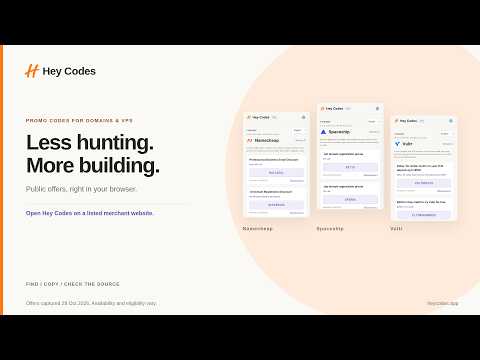
Find public domain and VPS offers. Click a promo code to copy it and check the official source.
Find public promo codes for domain and VPS merchants in a compact list. Open Hey Codes on a listed merchant website to see offer titles, discounts, promo codes, official sources and review dates. Hover over a bordered code to see “Click to copy”, or focus it with the keyboard. Click the code or press Enter to copy after a fresh-data check. What you can do • Browse current offers for the merchant you are checking. • Copy a selected code by clicking the code itself. • Open an official source to check the merchant’s terms and final price. • View code-free promotions without a copy control. • Switch between English and Simplified Chinese. • Clear cached offers in Settings. The current version supports browsing and copying. It does not automatically apply codes at real checkouts, complete purchases, guarantee savings or modify affiliate cookies. When an offer cannot be refreshed, cached data remains reference information and copying is disabled. The active tab URL is matched locally to registered merchants. Offer requests send the merchant identifier and language to the fixed API; the full page URL, account fields and payment details are not uploaded. Merchant logos are served by Hey Codes. Language preference stays on your device, while cached offers last for the browser session. A listed merchant is not necessarily a partner. Use the official source and checkout to confirm eligibility and the result for your order.
0 out of 5No ratings
Details
- Version0.3.6
- UpdatedNovember 11, 2026
- Size31.72KiB
- Languages2 languages
- DeveloperMuma TechWebsite
996 American River Bike Trail, River Gardens Sacramento, CA 95833 USEmail
wanglin010@gmail.com - Non-traderThis developer has not identified itself as a trader. For consumers in the European Union, please note that consumer rights do not apply to contracts between you and this developer.
Privacy

This developer declares that your data is
- Not being sold to third parties, outside of the approved use cases
- Not being used or transferred for purposes that are unrelated to the item's core functionality
- Not being used or transferred to determine creditworthiness or for lending purposes
Support
For help with questions, suggestions, or problems, please open this page on your desktop browser