Item logo image for Hermes IO

Hermes IO

5.0(

1 rating

)
Item media 3 (screenshot) for Hermes IO
Item video thumbnail
Item media 2 (screenshot) for Hermes IO
Item media 3 (screenshot) for Hermes IO
Item video thumbnail
Item media 2 (screenshot) for Hermes IO
Item media 3 (screenshot) for Hermes IO

Overview

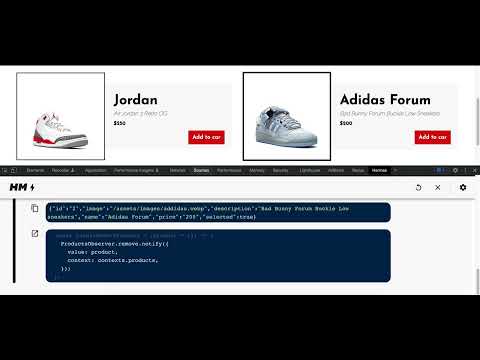
Developer tool that allows debugging step by step the changes on websites that uses hermes-io.js in a nice/easy to use UI.

Chrome extension that allows debugging step by step changes on websites that uses hermes-io.js on a nice/easy to use UI. Features: - Inspect in detail sequences of events - Fire and debug events - Inspect events parameters - Check where a given event come from in you source code

Details

  • Version
    1.3
  • Updated
    May 2, 2023
  • Offered by
    esnene02
  • Size
    2.74MiB
  • Languages
    English
  • Developer
    Email
    esnene02@gmail.com
  • Non-trader
    This developer has not identified itself as a trader. For consumers in the European Union, please note that consumer rights do not apply to contracts between you and this developer.

Privacy

Manage extensions and learn how they're being used in your organization

Hermes IO has disclosed the following information regarding the collection and usage of your data.

Hermes IO handles the following:

Website content

This developer declares that your data is

  • Not being sold to third parties, outside of the approved use cases
  • Not being used or transferred for purposes that are unrelated to the item's core functionality
  • Not being used or transferred to determine creditworthiness or for lending purposes

Support

Related

TypeScript Console

3.3

Run and debug TypeScript code in the Browser DevTools.

PixiJS DevTools

4.4

DevTools for PixiJS

Changedetection.io Website Monitor

3.9

Helps you to easily add web pages to your changedetection.io web page change detection dashboard.

Pesticide for Chrome - Simple

5.0

Toggle CSS outlines to debug layouts easily.

Web Developer

4.5

Adds a toolbar button with various web developer tools.

React Hook Form Developer Tools

2.4

React Hook Form developer tools to help debug forms with validation.

JS Library Detector

0.0

A simple tool that detects and lists JS libraries used by the currently webpage, and lets you copy them to the clipboard.

Alpine.js devtools

4.1

DevTools extension for debugging Alpine.js applications.

Debug Master: Debugging with ease

0.0

Simplify console errors with clear explanations for web dev.

by Crawford Squarespace Code Inspector

0.0

A tool that acts as a code inspector, displaying real-time CSS properties.

EziCloner – Clone Elementor Sections

5.0

Advanced webpage cloning tool that converts page elements into editable Elementor widgets.

Segment Debugger

3.0

A debugger tool helps to intercept segment events and display event properties

TypeScript Console

3.3

Run and debug TypeScript code in the Browser DevTools.

PixiJS DevTools

4.4

DevTools for PixiJS

Changedetection.io Website Monitor

3.9

Helps you to easily add web pages to your changedetection.io web page change detection dashboard.

Pesticide for Chrome - Simple

5.0

Toggle CSS outlines to debug layouts easily.

Web Developer

4.5

Adds a toolbar button with various web developer tools.

React Hook Form Developer Tools

2.4

React Hook Form developer tools to help debug forms with validation.

JS Library Detector

0.0

A simple tool that detects and lists JS libraries used by the currently webpage, and lets you copy them to the clipboard.

Alpine.js devtools

4.1

DevTools extension for debugging Alpine.js applications.

Google apps