


Overview
Attach real Hermes sessions to chosen tabs in your signed-in Chrome profile. Local, unofficial, by Corsen AI.
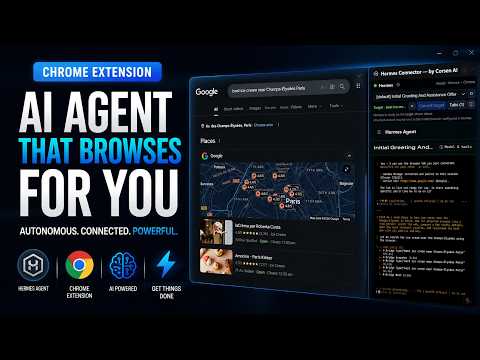
Connect Hermes Agent to the Chrome tabs you choose. Hermes Connector is a local AI browser automation bridge for Hermes Agent. It works directly with Hermes Desktop or the Hermes CLI through the local companion, optionally embeds your local Web dashboard in Chrome’s side panel, and routes each selected Hermes session only to the tabs you explicitly attach. Use your normal signed-in Chrome profile and existing website sessions—without a hidden automation profile and without guessing which tab an agent should control. WHAT YOU CAN DO • Choose a real local Hermes profile and session • Attach one or more Chrome tabs to that exact session • Let Hermes navigate, inspect, read, click, type, scroll, hover, select, drag, use keyboard shortcuts, take screenshots, search the page, and use browser history • Open, list, switch, and close tabs only within the selected session’s scope • Run multiple Hermes projects at the same time without crossing their tabs • Automatically refuse browser actions when a session has no attached target BUILT FOR PRECISE, LOCAL CONTROL Hermes Connector links Chrome to the separately installed Hermes Connector companion on 127.0.0.1. Session-to-tab bindings are explicit, isolated, and revocable. If ownership of a tab moves to another Hermes session or Chrome profile, the previous owner is revoked. LOCAL CONNECTOR, EXPLICIT CONTROL • No Corsen AI relay, cloud account, analytics, advertising, tracking, or telemetry • The pairing secret uses mutual authentication and is never sent over the connection • Hermes Desktop stays in its own app; the optional local Web dashboard runs inside an isolated side-panel frame • All browser-control logic is bundled with the extension; no remote control code is downloaded or evaluated DATA HANDLING To provide browser automation, the extension handles visible website content, requested screenshots, and the URLs and titles of tabs you attach. Opening “Tabs” displays current tab titles and URLs locally so you can select them. This data goes to your local Hermes installation—not to Corsen AI. The extension handles two kinds of Authentication information: (1) one persistent local Connector pairing credential stored in Chrome local storage, for which only HMAC proofs—not the credential itself—travel to the companion; and (2) in Web-dashboard mode only, an ephemeral Hermes local session token read into memory and returned only to that same loopback Hermes API. The session token is never stored. Neither item is received by Corsen AI, and the extension does not read website cookies or login storage. When no Web dashboard is running, the session list comes from the local companion over the same authenticated loopback connection: only session identifiers, profile names, titles and activity timestamps are transferred—never working directories, costs or message content. If you configured Hermes to use a remote AI model provider, Hermes may send relevant content to that provider under your configuration and that provider’s terms. Sensitive form values such as passwords, one-time codes, and payment fields are redacted from accessibility snapshots. Visible page text or screenshots can still contain sensitive information, so attach only tabs you are comfortable sharing with your Hermes configuration. TRUSTED INPUT Trusted input is disabled by default. When you enable it, Chrome’s debugger transport is used only for reliable input events and page-dialog handling in the selected attached tab. Chrome displays its debugging banner while attached. REQUIREMENTS • A local Hermes Agent installation through Hermes Desktop or the Web dashboard • The matching Hermes Connector companion, available from the support and download page • Chrome on a supported desktop system On first opening, the extension displays the exact companion download button, plain-language Windows/macOS/Linux steps, an explanation of the local-only component, and the pairing-code field. On Windows, the companion can be installed by double-clicking “Install Hermes Connector.cmd”. UPGRADING FROM AN OLDER VERSION Chrome updates the extension automatically, but the local companion must be downloaded and installed again. Fully quit and restart Hermes Desktop, dashboards, gateways, and chats after installing companion 0.2.6. Version 0.2.6 lists your Hermes sessions through the companion itself, so the side panel works with current Hermes releases whether or not a Web dashboard is running; the embedded dashboard remains available when you run `hermes dashboard`. Companion 0.2.6 keeps the version-checked protocol 5 broker on port 8767. On Windows, it also keeps its detached broker outside Hermes' managed virtual-environment launcher so it does not block later Hermes Desktop or CLI updates. The update notice and toolbar badge remain visible until you confirm the matching companion is installed. WATCH THE COMPLETE DEMO See the full installation and live browser-control walkthrough: https://www.youtube.com/watch?v=4akSq9cMmFw Hermes Connector is an unofficial community extension by Corsen AI. It is not affiliated with or endorsed by Nous Research or Google. OFFICIAL LINKS Corsen AI official website: https://corsen.ai/ Product, setup, and compatible downloads: https://corsenai.github.io/hermes-connector/ Version 0.2.6 release details: https://github.com/CorsenAI/hermes-connector/releases/tag/v0.2.6 Source code and releases: https://github.com/CorsenAI/hermes-connector Support: https://corsenai.github.io/hermes-connector/support/ Privacy policy: https://corsen.ai/privacy/hermes-connector/
5 out of 57 ratings
Details
- Version0.2.6
- UpdatedOctober 22, 2026
- Size65.66KiB
- LanguagesEnglish (United States)
- Developer
- TraderThis developer has identified itself as a trader per the definition from the European Union and committed to only offer products or services that comply with EU laws.
- D-U-N-S286675059
Privacy

Hermes Connector — by Corsen AI has disclosed the following information regarding the collection and usage of your data. More detailed information can be found in the developer's privacy policy.
Hermes Connector — by Corsen AI handles the following:
This developer declares that your data is
- Not being sold to third parties, outside of the approved use cases
- Not being used or transferred for purposes that are unrelated to the item's core functionality
- Not being used or transferred to determine creditworthiness or for lending purposes
Support
For help with questions, suggestions, or problems, visit the developer's support site