

uTranslate Live: Bilingual Subtitles & Live Video Translation

Overview
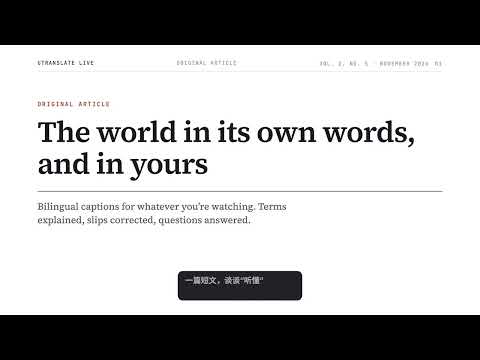
Free, no sign-up. Live bilingual subtitles for videos, streams, courses & podcasts, plus text selection translation & AI Q&A.
Watch foreign-language videos in your own language—free, with no sign-up required. Whenever a webpage plays audio, whether it’s a video, live stream, online course, or podcast, uTranslate Live delivers real-time bilingual subtitles and an AI side panel so you actually follow along and retain what matters. ✨ Why uTranslate Live • Works with or without subtitles, automatically: Whether a video comes with its own captions or has none at all, uTranslate Live seamlessly handles native captions or live speech recognition—delivering real-time subtitles in both the original language and your target language without picking a source language or switching modes • Works anywhere audio plays: Built for video platforms, live streams, online lectures, and podcasts across the web, with extra native-caption and player-control optimizations on popular video sites • Go beyond word-for-word translation: The AI side panel fixes misheard names and technical terms, explains unfamiliar vocabulary, and turns choppy speech into clean paragraphs. Summarize key points or ask questions about the video anytime, then jump right back to that exact moment • Free, no account, ready out of the box: No registration, no API keys to bring. Works in Chrome and Microsoft Edge 💬 Live Bilingual Subtitles • Translate into 30 target languages—switch effortlessly between translation only, bilingual view, or original only • Customize font size, background, placement, and dimensions, or pop captions out into a floating picture-in-picture window • Start from the toolbar or keyboard shortcut on any page with audio, plus quick one-click buttons right inside YouTube, Bilibili, TikTok, and Twitch players 📖 Understand as You Watch • Follow bilingual transcripts in the side panel and search anything said in the video • Summarize the last 5 minutes or the entire session in one click, and ask questions on the spot ✏️ Webpage Selection Translation • Highlight text on any webpage to translate via the right-click menu, keyboard shortcut, or floating icon • Get pronunciation and definitions for words and phrases, polish text already in your target language, and listen to natural read-aloud 🗂️ Caption History & Note Export • Automatically keep transcripts on your device and search across titles, originals, translations, and summaries • Export SRT subtitle files, plain text, or Markdown study notes complete with AI summaries ▶️ Get Started in 3 Steps 1. Open a page playing video or audio and click the uTranslate Live toolbar icon 2. Pick your target language and turn captions on (or click the in-player button on supported video sites) 3. Open the side panel for term lookups, summaries, and Q&A—or highlight text on any webpage to translate on the fly 🌐 Language Support Translates into 30 languages, with an interface localized in 17 languages—including English, Chinese, Japanese, Korean, Hindi, German, French, Spanish, and more—automatically matching your browser. Privacy & Support Speech recognition, translation, and AI features are processed in the cloud. Read our privacy policy: https://utlive.utranslate.net/privacy Feedback & questions: Reach out via “Feedback and rating” in extension settings, or email utlive@mail.utranslate.net
5 out of 52 ratings
Details
- Version2.5.1
- UpdatedNovember 18, 2026
- Size6.41MiB
- Languages19 languages
- DeveloperWebsite
Email
utlive@mail.utranslate.net - Non-traderThis developer has not identified itself as a trader. For consumers in the European Union, please note that consumer rights do not apply to contracts between you and this developer.
Privacy

uTranslate Live: Bilingual Subtitles & Live Video Translation has disclosed the following information regarding the collection and usage of your data. More detailed information can be found in the developer's privacy policy.
uTranslate Live: Bilingual Subtitles & Live Video Translation handles the following:
This developer declares that your data is
- Not being sold to third parties, outside of the approved use cases
- Not being used or transferred for purposes that are unrelated to the item's core functionality
- Not being used or transferred to determine creditworthiness or for lending purposes
Support
For help with questions, suggestions, or problems, please open this page on your desktop browser