

Find in Video — Search YouTube
2 ratings
)
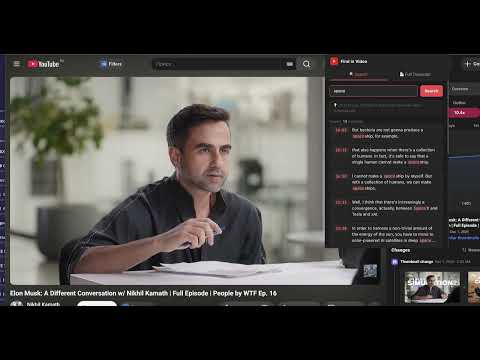
Overview
Search any word or phrase inside YouTube videos and jump to the exact moment. Copy or export the full transcript with timestamps.
Find in Video — Search YouTube Need to find a specific word in a YouTube video? Search inside any video and jump to the exact moment instantly — right in your browser. Simple but powerful YouTube transcript search. Find any word or phrase, jump to that moment, copy or download the full transcript. No uploads, no waiting, no account required. ✅ How to find words in a YouTube video 📌 Open any YouTube video Open any YouTube video in Chrome. No software to install. Works instantly on any video that has captions or auto-generated subtitles. 📌 Type what you're looking for Ever wondered how to search inside a YouTube video? Here's the answer. Type any word or phrase into the search box and see every match with exact timestamps — highlighted and ready to click. 📌 Jump to the exact moment Click any result to jump directly to that moment in the video. No more scrubbing through hours of content guessing where something was said. 📌 View the full transcript See the complete video transcript with timestamps. Click any line to jump to that moment. Perfect for following along or reviewing content. 📌 Copy with or without timestamps Copy the full transcript to your clipboard exactly how you need it — with timestamps like [1:42] or as clean plain text, ready to paste anywhere. 🚀 Quick Start Click "Add to Chrome" to install the Find in Video extension. Click the puzzle icon in the top right corner of Chrome and pin the extension to your toolbar. Open any YouTube video and click the extension icon to start searching. ✅ Find in Video is built for people who don't have time to rewatch entire videos Whether you need to find one quote in a two-hour podcast, locate a specific definition in a lecture, or pull a timestamp from an interview — our extension gives you the answer in seconds. Say goodbye to endless scrubbing. Find in Video makes searching YouTube videos as easy as searching a document. ⚡ Who is Find in Video for? 1️⃣ Students and researchers Find the exact moment a concept is explained in a lecture without rewatching the whole thing. Search across educational videos and export transcripts for notes and study materials. 2️⃣ Content creators Repurpose YouTube videos into blog posts, social media captions, newsletters, and show notes.. 3️⃣ Journalists and researchers Locate exact quotes with timestamps from interviews, press conferences, and talks. Copy transcript text with timestamps for accurate attribution and fact-checking. 4️⃣ Professionals and business users Search webinar recordings, earnings calls, and training videos for specific topics. Pull key points and export transcripts for team summaries and reports. 5️⃣ Non-native speakers Follow along with the full transcript while watching videos in a foreign language. Copy the text to translate or study at your own pace. 🔥 Searching inside YouTube videos has never been easier. Whether you need to find a word in a video, get a full transcript, or download subtitles, our intuitive interface works for users of all levels. Find in Video works on Mac and Windows — no software to install, no account to create. ❓ How to search inside a YouTube video? 📍 Install the extension: 🚀 Click "Add to Chrome" to install Find in Video directly from the Chrome Web Store. Pin the icon to your Chrome toolbar for instant access whenever you need to search a video. 📍 Open any YouTube video: 🚀 Navigate to any YouTube video. The extension works on any video that has captions or auto-generated subtitles — which includes the vast majority of YouTube content. 📍 Search for any word or phrase: 🚀 Click the extension icon, type your search term, and instantly see every match with timestamps. Click any result to jump straight to that moment. 📍 Get the full transcript: 🚀 Switch to the Full Transcript tab to read the entire video as text. Click any line to jump to that point in the video. 📍 Copy or export: 🚀 Copy the transcript to your clipboard with or without timestamps. 💡 No more wondering how to find words in a YouTube video! ✔ Why Find in Video: ✅ Instant word search inside any YouTube video ✅ Full transcript with clickable timestamps ✅ Copy with or without timestamps — your choice ✅ Download as TXT or SRT file ✅ Works on any YouTube video with captions ✅ No account required, no uploads, no limits ✅ Works on Mac and Windows ✅ Fast and lightweight — no impact on browsing speed ✅ Free to use ❤ Built with care — we're constantly improving Find in Video based on user feedback Find in Video — your all-in-one solution for searching inside YouTube videos. Add Find in Video to Chrome right now and find any word in any video in seconds! 👍 📧 Contact us Questions, suggestions, or feature requests? Reach out at mskingbots@gmail.com — we'd love to hear from you!
5 out of 52 ratings
Details
- Version1.0
- UpdatedJuly 26, 2026
- Offered bymskingbots
- Size27.83KiB
- LanguagesEnglish
- Developer
Email
mskingbots@gmail.com - Non-traderThis developer has not identified itself as a trader. For consumers in the European Union, please note that consumer rights do not apply to contracts between you and this developer.
Privacy

This developer declares that your data is
- Not being sold to third parties, outside of the approved use cases
- Not being used or transferred for purposes that are unrelated to the item's core functionality
- Not being used or transferred to determine creditworthiness or for lending purposes
Support
For help with questions, suggestions, or problems, please open this page on your desktop browser