


Overview
One-click MovingHelper job imports and Thumbtack lead imports — into Helprs, Google Calendar, Outlook, or Apple Calendar.
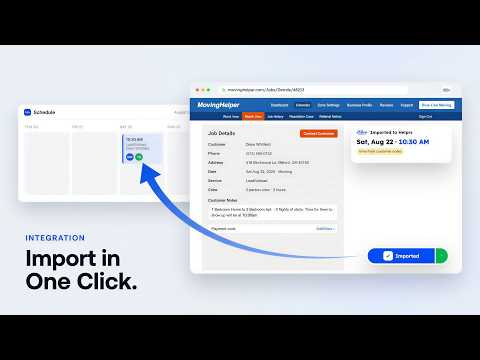
Stop retyping moving jobs. Helprs Import adds the MovingHelper job you're looking at to your schedule in one click — customer, address, crew size, hours, and notes included. Send it to Helprs, Google Calendar, Outlook, or Apple Calendar. HOW IT WORKS 1. Install and pick where your jobs should go. Calendars need no account at all; Helprs takes a free account (helprs.app). 2. Open a MovingHelper job details page. 3. Click "Import." Done — the job is on your schedule with every detail your crew needs on the day. CHOOSE YOUR DESTINATION • Helprs — full scheduling: crew assignment, customer texts, payments, and worker payouts. Duplicate-proof imports with one-click Undo. • Google Calendar or Outlook — a pre-filled event opens instantly; just hit Save. Customer contact info and notes ride along in the description. • Apple Calendar — a rich calendar file that opens straight into Calendar. Switch destinations anytime from the import button. SMART START TIMES If the customer's notes say "we'll be there at 10:30am," the appointment is scheduled for 10:30. No time in the notes? Your default for that Morning, Afternoon, or Evening arrival window is used — and you can change the time or undo right from the confirmation. BUILT FOR MOVING COMPANIES Helprs runs your whole operation — scheduling, crews, customers, quotes, payments, and worker payouts in one place. Helprs Import connects your marketplace jobs to it: no copy-paste, no wrong phone numbers, no missed crews. PRIVATE BY DESIGN Helprs Import reads a job page only when you click Import. Helprs imports go only to your own Helprs account; calendar imports go directly from the page into your own calendar and never touch our servers. No browsing history, no other sites, no marketplace credentials. Privacy policy: https://www.helprs.app/privacy/extension Not affiliated with or endorsed by U-Haul or Moving Help®. Google Calendar, Outlook, and Apple Calendar are trademarks of Google LLC, Microsoft Corporation, and Apple Inc., used only to identify the destination you choose.
0 out of 5No ratings
Details
- Version0.4.0
- UpdatedOctober 9, 2026
- Size1.38MiB
- LanguagesEnglish
- DeveloperHelprs Technology LLCWebsite
30 N Gould St Ste N Sheridan, WY 82801-6317 USEmail
dev@helprs.comPhone
+1 513-305-1153 - TraderThis developer has identified itself as a trader per the definition from the European Union and committed to only offer products or services that comply with EU laws.
- D-U-N-S144991998
Privacy

This developer declares that your data is
- Not being sold to third parties, outside of the approved use cases
- Not being used or transferred for purposes that are unrelated to the item's core functionality
- Not being used or transferred to determine creditworthiness or for lending purposes
Support
For help with questions, suggestions, or problems, visit the developer's support site