


Overview
Let a Helio assistant use your local Chrome, with your real login state.
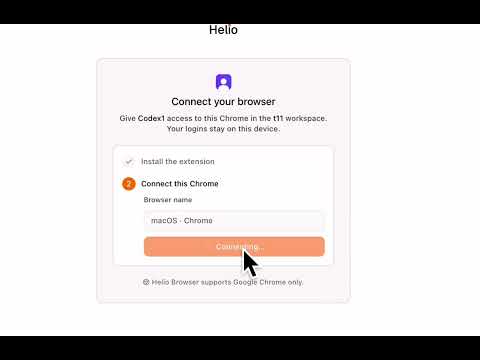
Helio Browser connects your Chrome to your Helio AI assistant (https://helio.im), so it can work in websites using your real login state — no bot detection walls, no re-authentication, no cloud browser. WHAT IT DOES When you ask your Helio assistant to do something on the web — research, fill forms, manage dashboards, or work in tools you're already signed in to — the assistant opens a dedicated tab group in your Chrome and works there, exactly like a colleague using your browser with your permission. HOW IT WORKS • Explicit pairing: nothing happens until you connect this browser to a specific assistant via a one-time link from the Helio app. You approve every pairing. • Visible presence: whenever the assistant is working, its tabs are grouped under the assistant's name and every page shows a "Helio is working" indicator. There is no hidden or background browsing. • You stay in control: take over any tab at any time — cancelling Chrome's debugging banner instantly ends all active sessions and leaves the tabs to you. Disconnect an assistant (or all of them) anytime from the popup. • Scoped to sessions: the assistant only sees and controls tabs inside its own session tab group. Your other tabs, windows, and browsing are never touched. PERMISSIONS, EXPLAINED • "debugger" — lets the paired assistant control pages inside its session tab group (Chrome DevTools Protocol). • Access to websites — used only to show the visible "Helio is working" indicator on pages inside a session, and to talk to Helio's servers. • "tabs" / "tabGroups" — to create and clean up the assistant's session tab group. • "storage" — to remember your pairing on this browser. REQUIREMENTS A Helio account (https://helio.im) with an AI assistant. Desktop Google Chrome only.
0 out of 5No ratings
Details
- Version0.1.0
- UpdatedJuly 23, 2026
- Size85.49KiB
- LanguagesEnglish (United States)
- DeveloperLifecycle AI, LLCWebsite
651 N Broad St, Suite 201 Middletown, DE 19709 USEmail
help@sheet0.comPhone
+1 650-705-5795 - TraderThis developer has identified itself as a trader per the definition from the European Union and committed to only offer products or services that comply with EU laws.
Privacy

Helio Browser has disclosed the following information regarding the collection and usage of your data. More detailed information can be found in the developer's privacy policy.
Helio Browser handles the following:
This developer declares that your data is
- Not being sold to third parties, outside of the approved use cases
- Not being used or transferred for purposes that are unrelated to the item's core functionality
- Not being used or transferred to determine creditworthiness or for lending purposes
Support
For help with questions, suggestions, or problems, visit the developer's support site