

Health Records Export for Maccabi

Overview
Ask an AI assistant about your Maccabi Online medical records: save them and every PDF as one ZIP on your computer. Unofficial.
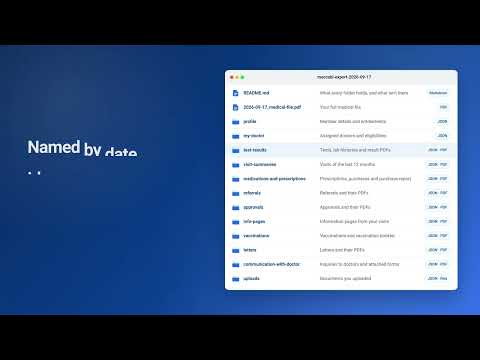
Ask an AI assistant about your Maccabi Online medical records, in plain language and in the language you speak. This extension saves them to your computer as one ZIP file: every PDF the site offers, plus the site's own data as JSON. Open the folder in the assistant you choose, and ask. Free and open source, with no servers of its own. Maccabi Online shows your records one section and one PDF at a time, and its medical-file form covers less than your whole history. The export gathers everything in one go, with a freshly ordered medical file that reaches back to your earliest visit. AI assistants that connect to medical records reach U.S. providers, not Maccabi Healthcare Services. This export is how your Maccabi health records get to one. WHAT IT HELPS YOU DO • See your whole history: each export orders a fresh copy of your full medical file, which reaches back to the earliest visit on record. • Ask in your own language: the records are mostly in Hebrew, and you can ask, and get answers, in English or whatever you speak. • Track changes over time: each lab measurement has its own history, often years long. • Prepare for your next visit: known problems, the latest results, recent visits and open referrals, in one place. • Check every answer: the assistant is asked to name the file, and the page of a PDF, behind each fact. It supports your doctor and doesn't replace them. For urgent symptoms, call a doctor or emergency services, not an assistant. THINGS TO ASK • "Summarize my health history from my full medical file" (a good place to start) • "Help me understand my latest blood test" • "How has my HbA1c changed over the years?" • "What should I raise at my next appointment?" • "Translate my latest letter from the clinic into English" • "Which referrals and approvals are still open?" • "Make a one-page summary to bring to a new doctor" GUARDRAILS FOR THE ASSISTANT The ZIP's README is written for the assistant that reads your records: it becomes the assistant's saved instructions, and the records become its project files. Claude Code and Codex find it without being told to; elsewhere, add it as the project's instructions. It asks the assistant to: • start with the full medical file, which reaches furthest back • name the file, and the page of a PDF, behind each fact, and give each its date • say plainly when a record suggests something needs a doctor soon • explain in plain language, without diagnosing or advising a change of treatment • not mistake something missing from the export for something that never happened • read correctly the lab values that mislead: missing ranges, results given as text, units that change over time • keep your name, ID number and contact details out of web searches and other tools Health Records Export for Maccabi collects the records that Maccabi Online shows you and saves them to your Downloads folder: • Test results, lab histories and result PDFs • Visit summaries from the last 12 months, with their PDFs • Prescriptions, your full pharmacy purchase history and the purchase report • Referrals, approvals and information pages • Vaccinations and the vaccination booklet • Letters • Messages with your doctor, and the forms attached to them • Documents you uploaded • Hospital stays, with discharge letters when the site has them • Your member details, entitlements and assigned doctors • Your full medical file, freshly ordered to cover your whole history HOW IT WORKS 1. Log in to Maccabi Online as usual. 2. On that tab, click the extension's icon and press Start export. 3. Keep the tab open and in front. Usually after a few minutes (up to 20 if the medical file is slow to arrive), the ZIP is in your Downloads folder and Chrome lets you know. 4. Unzip it and open the folder in the Claude desktop app, Claude Code, ChatGPT Work or Codex. 5. Ask about your records, starting with "Summarize my health history from my full medical file". While the export runs, the tab moves to the site's medical-file page and back. The extension keeps your Maccabi Healthcare Services session from timing out until the export finishes. If the session ends anyway, the export pauses. Log in again and press Resume. Files collected so far are kept. BEFORE YOU START Each export orders a fresh copy of your full medical file. It covers your whole history, which is wider than the range the site's own form offers. Maccabi Healthcare Services texts you about the order, and the new file replaces the previous one on the site. If an export already ordered one earlier the same day, the extension uses that copy. Ordering this file is the only change the extension makes to your account. WHAT YOU GET The ZIP has one folder for each part of the site. Every record is saved as the site's own data (JSON), exactly as the site sent it. If a record has a PDF, the PDF has the same name: the record's date, ID and title. The full medical file is at the top level of the ZIP, and it's the best place to start. A README in the ZIP explains what each folder holds and what the export leaves out. Not included: imaging studies (DICOM), which the site only opens in its own viewer, and visits older than 12 months, which the site doesn't show. The purchase report PDF covers the last 2 years, though the purchase history itself covers everything. If an item fails to download, the export carries on, and the popup lists the failed items when the export finishes. PRIVATE BY DESIGN Your records stop at your computer. You choose which AI assistant, if any, reads them. • Connects only to online.maccabi4u.co.il. No servers, analytics, tracking or remote code. • Reads nothing from the tab until you've read the notice and agreed. • Uses the session you're already logged in with. It never sees your password or one-time codes. • Deletes its own copy of your files as soon as the ZIP is saved. • Open source, and what ships isn't minified, so you can read exactly what runs: https://github.com/RoniRachmani/health-records-export-for-maccabi The ZIP isn't encrypted, and it contains your health information. Keep it somewhere safe. The extension sends your records nowhere, but an AI service you open them in can read them. Before you give it your health information, check what it keeps and for how long. Where the service lets you, turn off training on your chats, keep each person's records in a project of their own with memory kept to that project, and delete the project when you're done with it. Use the extension only with your own account, or with an account whose records you're legally entitled to access. It copies what Maccabi Online provides. It isn't medical advice, and the export isn't an official copy of your records. Unofficial. Not affiliated with, endorsed by or sponsored by Maccabi Healthcare Services.
0 out of 5No ratings
Details
- Version0.8.1
- UpdatedOctober 2, 2026
- Offered byHealth Records Export for Maccabi
- Size95.31KiB
- LanguagesEnglish
- Developer
Email
maccabi.a5s6c@addy.io - Non-traderThis developer has not identified itself as a trader. For consumers in the European Union, please note that consumer rights do not apply to contracts between you and this developer.
Privacy

Health Records Export for Maccabi has disclosed the following information regarding the collection and usage of your data. More detailed information can be found in the developer's privacy policy.
Health Records Export for Maccabi handles the following:
This developer declares that your data is
- Not being sold to third parties, outside of the approved use cases
- Not being used or transferred for purposes that are unrelated to the item's core functionality
- Not being used or transferred to determine creditworthiness or for lending purposes
Support
For help with questions, suggestions, or problems, please open this page on your desktop browser