

Headwise – Modify Request & Response Headers

Overview
Modify HTTP request and response headers with profiles and URL filters. Import profiles from JSON. Nothing leaves your browser.
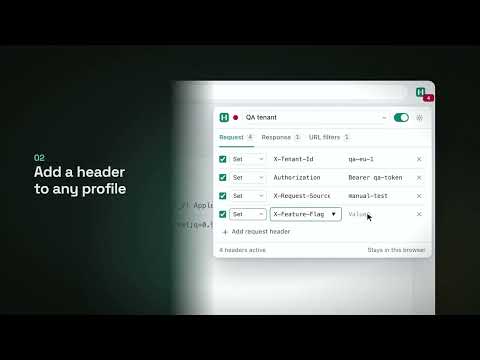
Headwise changes HTTP request and response headers in Chrome and Edge. Use it to send an auth token to a staging API, test CORS, try another user agent or language, or strip a header a server should not see. Your data never leaves your browser. Headwise has no account, no server, no analytics and no remote code. Your profiles live in the browser's local extension storage, and the extension makes no network requests of its own. What you can do • Set or remove any request header; append to standard headers such as Cookie or Accept • Set, append or remove any response header, such as Access-Control-Allow-Origin or Content-Security-Policy • Keep separate profiles for local, staging and production, and switch between them from the toolbar • Limit a profile to some URLs with patterns or regular expressions, or keep it away from others • Limit a profile to resource types such as pages, XHR / fetch or scripts • Pause everything with one switch; the toolbar badge shows how many headers are active • Export one profile or all of them as JSON, and import them on another machine or share them with your team Moving from ModHeader? Headwise is a ModHeader alternative that imports your existing setup. In ModHeader choose Export → Export JSON, then in Headwise open Settings → Import and export and pick the file. Request and response headers, append mode, URL filters and resource types carry over, and Headwise lists anything it could not bring across. Built on Manifest V3 Headwise uses the browser's declarativeNetRequest API. The browser applies your rules; Headwise never sees your requests, responses or the pages you visit. Permissions, and why • declarativeNetRequest – applies your header rules • storage – keeps your profiles on this device • Access to all sites – the browser only changes headers on sites an extension can access, and your URL filters decide where each profile applies Coming next: mock API responses and redirects in Headwise Pro. Everything listed above stays free.
0 out of 5No ratings
Details
- Version0.1.0
- UpdatedNovember 3, 2026
- Offered byQuiet Tools
- Size94.02KiB
- LanguagesEnglish
- Developer
Email
kovaldenys993@gmail.com - Non-traderThis developer has not identified itself as a trader. For consumers in the European Union, please note that consumer rights do not apply to contracts between you and this developer.
Privacy

This developer declares that your data is
- Not being sold to third parties, outside of the approved use cases
- Not being used or transferred for purposes that are unrelated to the item's core functionality
- Not being used or transferred to determine creditworthiness or for lending purposes
Support
For help with questions, suggestions, or problems, visit the developer's support site