

HDRezka Comfort View
2 ratings
)
Overview
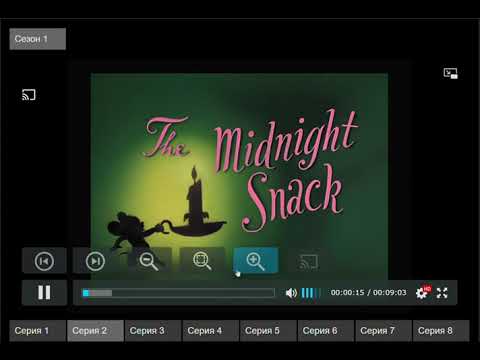
Adds a previous and next episode button on hdrezka websites, also adds video zoom in/out functionality with state save.
Chrome extension that keeps HDRezka binge-friendly with floating episode controls, casting helpers, and per-show zoom memory. Расширение Chrome, которое делает HDRezka удобным для просмотра в полноэкранном режиме, добавляя плавающие элементы управления эпизодами, помощь для Chromecast и память масштабирования для каждого сезона. Features: - Prev/Next episode buttons – float alongside the player controls, follow the active season automatically, and disable themselves when there is no next/previous item. - Auto-start after switching – when you jump to another episode the extension taps the player’s play control so the new episode starts without extra clicks. - Dedicated cast button – mirrors the native Chromecast state (inactive/active icon) and lets you start or stop casting from the main control row. - Cast-safe episode switching – while casting, the extension remembers the CDN stream for each episode and reloads the correct one into the active cast session whenever you move prev/next. - Auto-advance during cast – near the end of an episode the extension preps the player, advances to the next episode, and retries play so casting continues hands-free. - Rich tooltips and labels – buttons show clear S#:E# hints and update whenever the active episode changes. - Adaptive layout – buttons match the player’s shape/colors, size themselves to the control bar, and hide when the native UI collapses. - Video zoom controls – zoom in/out/reset buttons apply a smooth scale to the video; each show-season pair remembers its own zoom level. - Scroll-to-zoom – while a zoom button is hovered, the mouse wheel adjusts zoom (wheel down to zoom in, wheel up to zoom out) without moving the page.
3 out of 52 ratings
Details
- Version2.2.4
- UpdatedDecember 3, 2025
- Offered byDm17ryK
- Size24.62KiB
- Languagesрусский
- Developer
Email
dm17ryk@gmail.com - Non-traderThis developer has not identified itself as a trader. For consumers in the European Union, please note that consumer rights do not apply to contracts between you and this developer.
Privacy

This developer declares that your data is
- Not being sold to third parties, outside of the approved use cases
- Not being used or transferred for purposes that are unrelated to the item's core functionality
- Not being used or transferred to determine creditworthiness or for lending purposes
Support
For help with questions, suggestions, or problems, please open this page on your desktop browser