


Overview
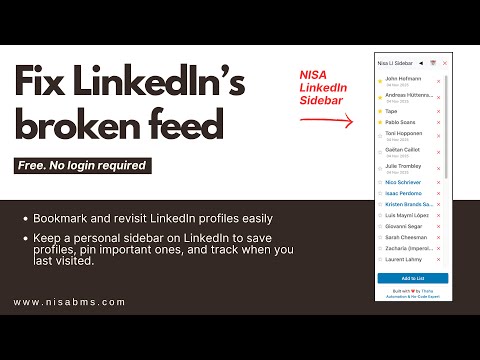
Bookmark and organize LinkedIn profiles with a smart sidebar. Built for regular LinkedIn users.
Bookmark and organize LinkedIn profiles with a smart sidebar. Built for regular LinkedIn users. Benefits: - Save LinkedIn profiles to a handy sidebar - See your saved profiles while browsing LinkedIn - Open each person’s recent activity page quickly - Pin important people to the top - Mark people you want to nurture - Move inactive people to backburner - Add a personal check-in time like 9am or US morning - See when you last checked each person - Keep your list synced across Chrome browsers - Organize your LinkedIn follow-ups without a spreadsheet Updates: ## v1.11.0 — 2026-08-21 - Increased sidebar width to 300px and refreshed the sidebar with a soft butter-yellow theme. - Added compact Starred and Nurture previews, showing three contacts with an option to show all. - Replaced separate Star and Nurture controls with one mutually exclusive status icon. - Added a three-dot menu with links for connections, sent invitations, profile views, top posts, and analytics. - Submenu links now open in the current tab. - Updated footer role label to "Systems Designer". ## v1.10.0 — 2026-07-10 - Added backburner status (⏸) to move low-activity profiles into a separate lower section - Added manual check time labels for each saved profile, editable from the sidebar clock button - Hardened sidebar row styles so LinkedIn page CSS does not resize profile names and controls - Fixed date visibility setting so turning dates off stays saved after reload ## v1.9.2 — 2026-06-23 - Fixed: LinkedIn profile name lookup now uses stable heading selectors instead of hashed class names ## v1.9.1 — 2026-03-11 - Fixed: existing data is automatically migrated from local storage to sync on update (no data loss) ## v1.9 — 2026-03-11 - Data now syncs across all your computers automatically via Chrome Sync - Install the extension on any machine signed into the same Google account and your profiles appear instantly ## v1.8 — 2026-03-04 - Added "Nurture" feature (🌱) to mark contacts you're building relationships with before sending connection requests - Nurture contacts appear in their own section between pinned and regular profiles - Updated sorting priority: Pinned → Nurture → Regular (all sorted by last visit, oldest first) - Added separator line after nurture section - "Today" label now only appears for regular (non-pinned, non-nurture) profiles v1.7 — 2026-02-26 - Changed sort order to ascending (last visited person appears at bottom of list) - Added separator line after starred/pinned profiles - Added "Today" separator label for profiles visited today - Fixed "Add to List" button to work with LinkedIn's updated page structure (h2 selector) - Added visible status message area for error and success messages - Added comprehensive error handling for extension context invalidation with user-friendly messages v1.6 — 2025-12-01 - Link now opens directly to a profile’s Posts tab instead of the main profile. v1.5 — 2025-11-24 - Added tooltip to the date toggle. - Automatically saves the “last viewed” date when adding a profile for the first time. v1.3 — 2025-11-05 - The “Show dates” feature is now enabled by default on installation. v1.2 — 2025-11-05 - Profiles now sort automatically: pinned first, then most recently visited. - Added a 📅 toggle to show or hide last-visit dates. - Added automatic tracking + display of each profile’s last visit date. v1.1 — 2025-11-04 - Added pin / unpin functionality. v1.0 — 2025-11-01 - Initial release.
0 out of 5No ratings
Details
- Version1.11.0
- UpdatedAugust 22, 2026
- Size22.06KiB
- LanguagesEnglish
- DeveloperWebsite
Email
chromeextension@beautifulwebsites.dev - Non-traderThis developer has not identified itself as a trader. For consumers in the European Union, please note that consumer rights do not apply to contracts between you and this developer.
Privacy

This developer declares that your data is
- Not being sold to third parties, outside of the approved use cases
- Not being used or transferred for purposes that are unrelated to the item's core functionality
- Not being used or transferred to determine creditworthiness or for lending purposes
Support
For help with questions, suggestions, or problems, please open this page on your desktop browser