
![รูปภาพโลโก้สินค้าสำหรับ HBO Max Picture in Picture [QVI]](https://lh3.googleusercontent.com/4pzdGlvJO6yq2WxPbOKHdRroSbasJELgsDpekqFtG2TTwdaDFWWUKWywJzY1WQd8u8KUlPhd9TopvHOovDaCh9-5Cw=s60)
HBO Max Picture in Picture [QVI]
การให้คะแนน 23 รายการ
)![รายการสื่อ 2 (ภาพหน้าจอ) สำหรับ HBO Max Picture in Picture [QVI]](data:image/gif;base64,R0lGODlhAQABAIAAAP///////yH5BAEKAAEALAAAAAABAAEAAAICTAEAOw==)
ภาพรวม
Extension to watch HBOMax in Picture in Picture mode. Enables a separate floating window to enjoy your favorite video content.
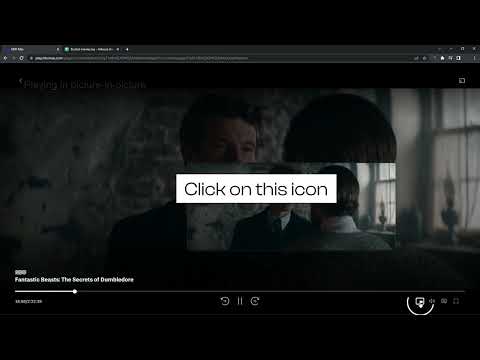
We're thrilled to present the latest update, where we've listened to your feedback and made it happen – introducing the much-anticipated Picture-in-Picture icon with subtitles support! 🌟 What's New: New Picture-in-Picture Icon: Now you can enjoy uninterrupted viewing while diving into other tasks, all with the added bonus of subtitles! Are you looking for a tool to watch HBOmax in a convenient always-on-top window? You’re in the right place! Focus on other tasks while watching your favorite series. HBO Max Picture in Picture is perfect for multitasking, having something on in the background, or even working from home (we don’t advise sharing it with your boss though). There’s no need to stack multiple browser tabs anymore or to use other screens, it’s all fixed by this extension. How does it work? HBO Max Picture in Picture allows you to play video content in a floating window pinned always on top, so you can use the rest of your screen for other tasks. This extension adds an extra control button, which can be found among other viewing options (e.g. full-screen). Just click on it to launch a separate window with the show you’d like to watch and place it wherever you want, whether you're browsing your FB feed or preparing a business presentation. All you need to do is add HBOMax Picture in Picture extension to your browser and enjoy your favorite series in the background. It's as simple as that! This extension is part of the Quality Viewership Initiative, a collaborative effort to enhance the understanding of audience engagement. It collects anonymous, aggregated viewing insights to support creators and studios in improving the quality of their content. You can stop sharing your information at any time by switching the toggle on the options page. Disclaimer: HBO is a trademark of Home Box Office, Inc.. This website & extension hold no association or affiliation with HBO Max or any third-party companies.
4.7 จาก 5 คะแนนการให้คะแนน 23 รายการ
รายละเอียด
- รุ่น0.0.43
- อัปเดตแล้ว10 เมษายน 2569
- นำเสนอโดยTheBestChromeExtensions
- ขนาด187KiB
- ภาษา7 ภาษา
- นักพัฒนาซอฟต์แวร์HideApp LLC
1021 East Lincolnway Cheyenne, WY 82001 USอีเมล
disneypictureinpicture@gmail.comโทรศัพท์
+1 802-284-5301 - ผู้ค้านักพัฒนาซอฟต์แวร์รายนี้ระบุว่าตัวเองเป็นผู้ค้าตามคำจำกัดความของสหภาพยุโรปและมุ่งมั่นที่จะนำเสนอเฉพาะผลิตภัณฑ์หรือบริการที่เป็นไปตามกฎหมายของสหภาพยุโรป
- D-U-N-S132615120
ความเป็นส่วนตัว

HBO Max Picture in Picture [QVI] ได้เปิดเผยข้อมูลต่อไปนี้ซึ่งเกี่ยวกับการเก็บรวบรวมและการใช้ข้อมูลของคุณ ดูข้อมูลโดยละเอียดเพิ่มเติมได้ที่privacy policyของนักพัฒนาแอป
HBO Max Picture in Picture [QVI] จะจัดการสิ่งต่อไปนี้
นักพัฒนาซอฟต์แวร์รายนี้ประกาศว่าข้อมูลของคุณจะ
- ไม่ถูกขายไปยังบุคคลที่สามหากไม่ใช่ Use Case ที่ได้รับอนุมัติ
- ไม่ถูกใช้หรือถูกโอนเพื่อวัตถุประสงค์ที่ไม่เกี่ยวข้องกับฟังก์ชันการทำงานหลักของรายการ
- ไม่ถูกใช้หรือถูกโอนเพื่อพิจารณาความน่าเชื่อถือทางเครดิตหรือเพื่อวัตถุประสงค์การให้สินเชื่อ
สนับสนุน
โปรดเปิดหน้านี้บนเบราว์เซอร์ในเดสก์ท็อป หากมีข้อสงสัย ต้องการขอคำแนะนำ หรือประสบปัญหาใดๆ