
![Gambar logo item untuk HBO Max Picture in Picture [QVI]](https://lh3.googleusercontent.com/4pzdGlvJO6yq2WxPbOKHdRroSbasJELgsDpekqFtG2TTwdaDFWWUKWywJzY1WQd8u8KUlPhd9TopvHOovDaCh9-5Cw=s60)
HBO Max Picture in Picture [QVI]
23 rating
)![Media item 2 (screenshot) untuk HBO Max Picture in Picture [QVI]](data:image/gif;base64,R0lGODlhAQABAIAAAP///////yH5BAEKAAEALAAAAAABAAEAAAICTAEAOw==)
Ringkasan
Extension to watch HBOMax in Picture in Picture mode. Enables a separate floating window to enjoy your favorite video content.
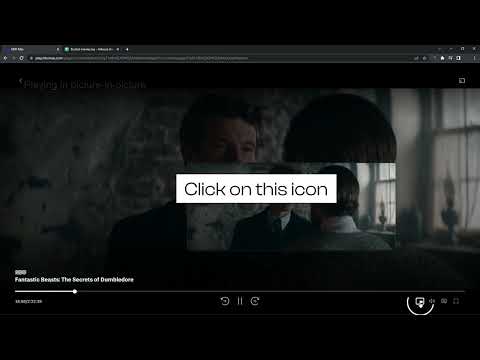
We're thrilled to present the latest update, where we've listened to your feedback and made it happen – introducing the much-anticipated Picture-in-Picture icon with subtitles support! 🌟 What's New: New Picture-in-Picture Icon: Now you can enjoy uninterrupted viewing while diving into other tasks, all with the added bonus of subtitles! Are you looking for a tool to watch HBOmax in a convenient always-on-top window? You’re in the right place! Focus on other tasks while watching your favorite series. HBO Max Picture in Picture is perfect for multitasking, having something on in the background, or even working from home (we don’t advise sharing it with your boss though). There’s no need to stack multiple browser tabs anymore or to use other screens, it’s all fixed by this extension. How does it work? HBO Max Picture in Picture allows you to play video content in a floating window pinned always on top, so you can use the rest of your screen for other tasks. This extension adds an extra control button, which can be found among other viewing options (e.g. full-screen). Just click on it to launch a separate window with the show you’d like to watch and place it wherever you want, whether you're browsing your FB feed or preparing a business presentation. All you need to do is add HBOMax Picture in Picture extension to your browser and enjoy your favorite series in the background. It's as simple as that! This extension is part of the Quality Viewership Initiative, a collaborative effort to enhance the understanding of audience engagement. It collects anonymous, aggregated viewing insights to support creators and studios in improving the quality of their content. You can stop sharing your information at any time by switching the toggle on the options page. Disclaimer: HBO is a trademark of Home Box Office, Inc.. This website & extension hold no association or affiliation with HBO Max or any third-party companies.
4,7 dari 523 rating
Detail
- Versi0.0.43
- Diupdate10 April 2026
- Ditawarkan olehTheBestChromeExtensions
- Ukuran187KiB
- Bahasa7 bahasa
- DeveloperHideApp LLC
1021 East Lincolnway Cheyenne, WY 82001 USEmail
disneypictureinpicture@gmail.comTelepon
+1 802-284-5301 - PedagangDeveloper ini telah mengidentifikasi diri sebagai pedagang berdasarkan definisi dari Uni Eropa dan berkomitmen untuk hanya menawarkan produk atau layanan yang mematuhi hukum Uni Eropa.
- D-U-N-S132615120
Privasi

HBO Max Picture in Picture [QVI] telah mengungkapkan informasi berikut ini terkait pengumpulan dan penggunaan data Anda. Informasi lebih mendetail dapat dilihat di privacy policy developer.
HBO Max Picture in Picture [QVI] menangani hal berikut:
Developer ini menyatakan bahwa data Anda
- Tidak dijual ke pihak ketiga, di luar kasus penggunaan yang disetujui
- Tidak digunakan atau ditransfer untuk tujuan yang tidak terkait dengan fungsi inti item
- Tidak digunakan atau ditransfer untuk menentukan kelayakan kredit atau untuk tujuan pinjaman
Dukungan
Untuk mendapatkan bantuan terkait pertanyaan, saran, atau masalah, buka halaman ini di browser desktop Anda