HBO Max Extended: HBO を修正するためのツール [QVI] のアイテムロゴ画像

HBO Max Extended: HBO を修正するためのツール [QVI]

3.1(

34 件の評価

)
拡張機能楽しみ4,000 ユーザー
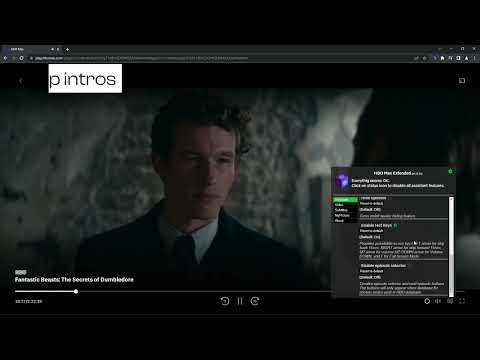
HBO Max Extended: HBO を修正するためのツール [QVI] のアイテム メディア 2 のスクリーンショット
HBO Max Extended: HBO を修正するためのツール [QVI] のアイテム メディア 1 のスクリーンショット
HBO Max Extended: HBO を修正するためのツール [QVI] のアイテム メディア 2 のスクリーンショット
HBO Max Extended: HBO を修正するためのツール [QVI] のアイテム メディア 1 のスクリーンショット
HBO Max Extended: HBO を修正するためのツール [QVI] のアイテム メディア 2 のスクリーンショット

概要

HBO Max のエクスペリエンスを向上させるための便利なツール: 再生速度を調整し、マウス カーソルを非表示にし、画面を回転させ、カスタム字幕を作成します。

Be in the driver's seat 🚗 of your viewing experience! HBO Max Extended is a great tool 🔧 which unifies multiple functionalities in one easy-to-use extension and gives you more control 🎮 over the HBO Max platform. [Works also with MAX in US services🇺🇸] Now you're able to: Turn the cursor off in the full screen mode ❌🖱️ Speed up ⏫ or slow down ⏬ the playback speed Rotate the screen 🔄 Customize subtitles 📝 All you need to do is add the HBO Max Extended extension to your browser 🌐, run the control panel 🕹️, choose the options you're interested in and enjoy watching content tailored to your personal viewing preferences 📺. It's as simple as that! ✔️ This extension is part of the Quality Viewership Initiative, a collaborative effort to enhance the understanding of audience engagement. It collects anonymous, aggregated viewing insights to support creators and studios in improving the quality of their content. You can stop sharing your information at any time by switching the toggle on the options page. ❗*Disclaimer: All product and company names are trademarks ™️ or registered trademarks ®️ of their respective holders. This extension holds no association or affiliation with them or any third-party companies.*❗

詳細

  • バージョン
    1.3.56
  • 更新:
    2026年7月10日
  • 提供元
    BestChromeExtensions
  • サイズ
    426KiB
  • 言語
    55 言語
  • デベロッパー
    HideApp
    1021 E Lincolnway Cheyenne, WY 82001-4851 US
    メール
    disneypartyapp@gmail.com
    電話
    +1 920-714-7945
  • トレーダー
    デベロッパーは、欧州連合の定義に基づき、取引業者として申告し、EU の法律を遵守した商品やサービスのみを提供することを約束しています。

プライバシー

拡張機能を管理し、組織での使用状況を確認できます

HBO Max Extended: HBO を修正するためのツール [QVI] から、お客様のデータの収集と使用に関する以下の情報が開示されています。 詳しくは、デベロッパーの privacy policy をご確認ください。

HBO Max Extended: HBO を修正するためのツール [QVI] は次を扱います。

個人を特定できる情報
認証に関する情報
位置情報
ユーザーのアクティビティ
ウェブサイトのコンテンツ

このデベロッパーは、お客様のデータについて以下を宣言しています

  • 承認されている以外の用途で第三者に販売しないこと
  • アイテムの中心機能と関係のない目的で使用または転送しないこと
  • 信用力を判断する目的または融資目的で使用または転送しないこと

サポート

関連アイテム

HBOmax Skipper: 広告、イントロ、要約をスキップ [QVI]

3.6

HBOMaxで広告、イントロ、要約を自動でスキップし、次のエピソードボタンをクリックします

Extended works with Paramount Plus [QVI]

3.7

Independent software not affiliated with Paramount. Control Paramount+ with speed adjust, skip intros and hide spoilers.

Film Scores for HBO Max : TMDB ratings [QVI]

3.5

View movie ratings directly on HBO Max. Based on scores from: TMDB.

Hide Mouse for HBO Max

4.8

Hide the mouse while viewing a HBO Max video

HBO Max HQ: change video quality [QVI]

3.1

Extension to change video quality on HBO Max. Choose your preferred video resolution on HBO Max.

Netflix™ Extended [QVI]

4.4

Extension for Netflix™ to skip intros, recaps, start next movie/episode in faster pace and many more.

HBO Max Speeder: 再生速度を調整する [QVI]

4.4

拡張機能を使用すると、好みに応じて HBO Max の再生速度を調整できます

Mouse Off for HBO Max: hide cursor [QVI]

4.0

Hide the mouse cursor on HBO Max. New features: go full screen with double click & keyboard shortcuts added.

拡張ストリーミング、Disney Plusで動作

2.6

独立したソフトウェア - Disneyとは提携していません。Disney+の再生を制御: 速度を変更、イントロをスキップ、ネタバレを非表示。

HBO Max SubStyler:字幕をカスタマイズ [QVI]

5.0

HBO Maxで字幕やキャプションをカスタマイズする拡張機能。テキストサイズ、フォント、色、背景を変更できます。

HBO Max Episode Selector: HBOエピソード一覧。 [QVI]

3.7

この拡張機能は、HBO Maxシリーズの視聴中にエピソードを選択するためのエピソード一覧ボタンを追加します。

HBO Max のキーボードショートカット [QVI]

4.7

この拡張機能を使うと、HBO Max でキーボードショートカットを利用できます。

HBOmax Skipper: 広告、イントロ、要約をスキップ [QVI]

3.6

HBOMaxで広告、イントロ、要約を自動でスキップし、次のエピソードボタンをクリックします

Extended works with Paramount Plus [QVI]

3.7

Independent software not affiliated with Paramount. Control Paramount+ with speed adjust, skip intros and hide spoilers.

Film Scores for HBO Max : TMDB ratings [QVI]

3.5

View movie ratings directly on HBO Max. Based on scores from: TMDB.

Hide Mouse for HBO Max

4.8

Hide the mouse while viewing a HBO Max video

HBO Max HQ: change video quality [QVI]

3.1

Extension to change video quality on HBO Max. Choose your preferred video resolution on HBO Max.

Netflix™ Extended [QVI]

4.4

Extension for Netflix™ to skip intros, recaps, start next movie/episode in faster pace and many more.

HBO Max Speeder: 再生速度を調整する [QVI]

4.4

拡張機能を使用すると、好みに応じて HBO Max の再生速度を調整できます

Mouse Off for HBO Max: hide cursor [QVI]

4.0

Hide the mouse cursor on HBO Max. New features: go full screen with double click & keyboard shortcuts added.

Google アプリ