
![「HBO Max Episode Selector: HBO episode list. [QVI]」的項目標誌圖片](https://lh3.googleusercontent.com/ELFRCO5SM81KJhrqnhcvgHDstwrRpaPcIll81grK-xkLxon-JRAKacRD4dx1ELJqvHZfH3_mtJPv_FcnU6kc6-VbJWE=s60)
HBO Max Episode Selector: HBO episode list. [QVI]
3 個評分
)![HBO Max Episode Selector: HBO episode list. [QVI]的項目媒體 3 (螢幕截圖)](data:image/gif;base64,R0lGODlhAQABAIAAAP///////yH5BAEKAAEALAAAAAABAAEAAAICTAEAOw==)
總覽
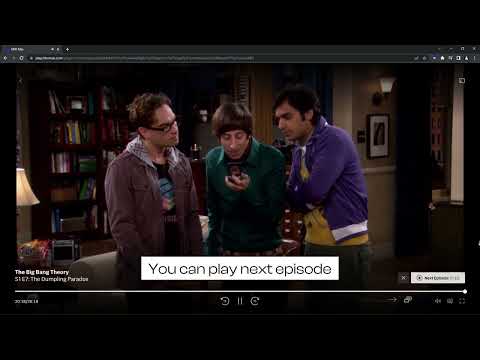
Extension adds an episode list button to select the episode while watching HBOMax series.
Go to the next episode smoothly with HBOMax Episode Selector. No more searching for the series through the home page, no more going back and forth to change the episode. This extension improves HBOMax navigation by adding 2 new Netflix-like buttons. Now you’ll be able to go to the next episode straight from the one you're watching or see the episode list and choose one of them. How to use HBOMax Episode Selector? 1. Add the extension to your Chrome browser. 2. Go to HBOMax and pick a TV show to watch. 3. Navigate to the playback options (at the bottom of the player). You should see 2 new icons next to the volume icon - Next episode and Select Episode. 4. Click on the next episode button to start the next episode. Click on the select episode button to navigate through the episodes. The list will show the current episode, 3 previous, and 3 next ones. Entertainment shouldn't be complicated. Enjoy watching your favorite series with easy access to more episodes. Changelog: Version 1.2.19 (2024-11-29) Improved overall performance. Added support for additional shows (Hard Knocks). Version 1.2.18 (2024-10-15) Fixed minor bugs. Enhanced support for newly released shows (Salem's Lot). Version 1.2.17 (2024-09-10) Fixed minor UI bugs. Version 1.2.16 (2024-08-14) Resolved a rare issue causing crashes. Added support for additional shows (The Penguin). Version 1.2.15 (2024-07-16) Added support for additional shows (Last Week Tonight with John Oliver). Version 1.2.14 (2024-06-04) Addressed minor bugs reported by users. Version 1.2.13 (2024-05-13) Fixed a bug affecting playback controls. Version 1.2.12 (2024-04-01) Optimized compatibility issues with various titles. Version 1.2.11 (2024-02-17) Added compatibility for additional shows (South Park). Fixed minor issues with languages. Version 1.2.10 (2024-02-02) Enhanced compatibility for newer browsers. Version 1.2.9 (2024-01-12) Added support for additional shows (Game of Thrones). Version 1.2.8 (2023-12-01) Fixed minor issues with extension icon display. Version 1.2.7 (2023-10-01) Various bug fixes. Version 1.2.6 (2023-08-03) Resolved a bug causing errors in specific regional settings. Version 1.2.5 (2023-06-15) Addressed various bugs and issues. Optimized performance. Version 1.2.4 (2023-05-07) Added support for additional shows (Friends). Version 1.2.3 (2023-04-23) Fixed minor UI glitches. Version 1.2.2 (2023-02-01) Resolved compatibility issues with specific movie titles. Version 1.2.1 (2022-09-08) Added support for additional shows (Rick and Morty). Fixed minor bugs. Version 1.2.0 (2022-07-19) Added support for new titles (The Big Bang Theory, Sex and the City). Improved performance and resolved minor issues. Version 1.1.0 (2022-05-01) Added support for new titles (Gossip Girl). Implemented bug fixes for various movies (Batman: The Dark Knight Rises, Harry Potter series). Version 1.0.0 (2022-04-15) Initial release with core functionality. Disclaimer: HBO is a trademark of Home Box Office, Inc. This website & extension hold no association or affiliation with HBO Max or any third-party companies.
3.7 分 (滿分 5 分)3 個評分
詳細資料
- 版本1.2.34
- 已更新2026年1月21日
- 提供者TheBestChromeExtensions
- 大小152KiB
- 語言10 種語言
- 開發人員HideApp LLC
1021 East Lincolnway Cheyenne, WY 82001 US電子郵件
disneypictureinpicture@gmail.com電話
+1 802-284-5301 - 交易商這位開發人員表明自己是交易商 (依歐盟的定義),並承諾只提供符合歐盟法律的產品或服務。
- 鄧白氏環球編碼132615120
隱私權
「HBO Max Episode Selector: HBO episode list. [QVI]」已揭露下列關於收集及使用資料的資訊。 如需更多詳細資訊,請參閱開發人員的《privacy policy》。
HBO Max Episode Selector: HBO episode list. [QVI] 會處理下列資料:
這位開發者就你的資料做出下列聲明:
- 除經核准的用途外,不會將你的資料販售給第三方
- 不會基於與商品核心功能無關的目的,使用或轉移資料
- 不會為了確認信用度或基於貸款目的,使用或轉移資料
支援
如有疑問或建議,請使用電腦版瀏覽器開啟這個頁面