
![תמונת לוגו הפריט של HBO Max Episode Selector: HBO episode list. [QVI]](https://lh3.googleusercontent.com/ELFRCO5SM81KJhrqnhcvgHDstwrRpaPcIll81grK-xkLxon-JRAKacRD4dx1ELJqvHZfH3_mtJPv_FcnU6kc6-VbJWE=s60)
HBO Max Episode Selector: HBO episode list. [QVI]
3 דירוגים
)![פריט מדיה 3 (צילום מסך) של HBO Max Episode Selector: HBO episode list. [QVI]](data:image/gif;base64,R0lGODlhAQABAIAAAP///////yH5BAEKAAEALAAAAAABAAEAAAICTAEAOw==)
סקירה כללית
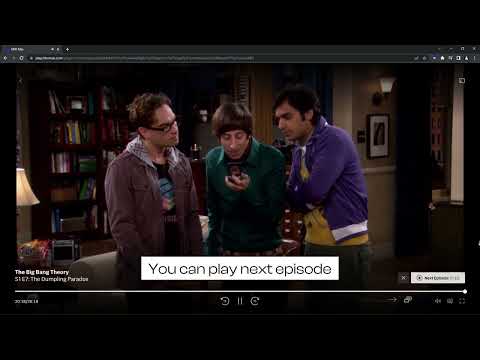
Extension adds an episode list button to select the episode while watching HBOMax series.
Go to the next episode smoothly with HBOMax Episode Selector. No more searching for the series through the home page, no more going back and forth to change the episode. This extension improves HBOMax navigation by adding 2 new Netflix-like buttons. Now you’ll be able to go to the next episode straight from the one you're watching or see the episode list and choose one of them. How to use HBOMax Episode Selector? 1. Add the extension to your Chrome browser. 2. Go to HBOMax and pick a TV show to watch. 3. Navigate to the playback options (at the bottom of the player). You should see 2 new icons next to the volume icon - Next episode and Select Episode. 4. Click on the next episode button to start the next episode. Click on the select episode button to navigate through the episodes. The list will show the current episode, 3 previous, and 3 next ones. Entertainment shouldn't be complicated. Enjoy watching your favorite series with easy access to more episodes. Changelog: Version 1.2.19 (2024-11-29) Improved overall performance. Added support for additional shows (Hard Knocks). Version 1.2.18 (2024-10-15) Fixed minor bugs. Enhanced support for newly released shows (Salem's Lot). Version 1.2.17 (2024-09-10) Fixed minor UI bugs. Version 1.2.16 (2024-08-14) Resolved a rare issue causing crashes. Added support for additional shows (The Penguin). Version 1.2.15 (2024-07-16) Added support for additional shows (Last Week Tonight with John Oliver). Version 1.2.14 (2024-06-04) Addressed minor bugs reported by users. Version 1.2.13 (2024-05-13) Fixed a bug affecting playback controls. Version 1.2.12 (2024-04-01) Optimized compatibility issues with various titles. Version 1.2.11 (2024-02-17) Added compatibility for additional shows (South Park). Fixed minor issues with languages. Version 1.2.10 (2024-02-02) Enhanced compatibility for newer browsers. Version 1.2.9 (2024-01-12) Added support for additional shows (Game of Thrones). Version 1.2.8 (2023-12-01) Fixed minor issues with extension icon display. Version 1.2.7 (2023-10-01) Various bug fixes. Version 1.2.6 (2023-08-03) Resolved a bug causing errors in specific regional settings. Version 1.2.5 (2023-06-15) Addressed various bugs and issues. Optimized performance. Version 1.2.4 (2023-05-07) Added support for additional shows (Friends). Version 1.2.3 (2023-04-23) Fixed minor UI glitches. Version 1.2.2 (2023-02-01) Resolved compatibility issues with specific movie titles. Version 1.2.1 (2022-09-08) Added support for additional shows (Rick and Morty). Fixed minor bugs. Version 1.2.0 (2022-07-19) Added support for new titles (The Big Bang Theory, Sex and the City). Improved performance and resolved minor issues. Version 1.1.0 (2022-05-01) Added support for new titles (Gossip Girl). Implemented bug fixes for various movies (Batman: The Dark Knight Rises, Harry Potter series). Version 1.0.0 (2022-04-15) Initial release with core functionality. Disclaimer: HBO is a trademark of Home Box Office, Inc. This website & extension hold no association or affiliation with HBO Max or any third-party companies.
3.7 מתוך 53 דירוגים
פרטים
- גרסה1.2.37
- עדכון אחרון5 בפברואר 2026
- מאתTheBestChromeExtensions
- גודל162KiB
- שפות10 שפות
- מפתחHideApp LLC
1021 East Lincolnway Cheyenne, WY 82001 USאימייל
disneypictureinpicture@gmail.comטלפון
+1 802-284-5301 - עסקהמפַתח הזה ציין שהעסק שלו מוגדר לפי התקנות באיחוד האירופי, והתחייב להציע רק מוצרים או שירותים שעומדים בדרישות של חוקי האיחוד האירופי.
- D-U-N-S132615120
פרטיות

הפרטים הבאים נמסרו על ידי HBO Max Episode Selector: HBO episode list. [QVI] בנוגע לאיסוף הנתונים שלך ולשימוש בהם. מידע מפורט זמין בprivacy policy של המפתח.
HBO Max Episode Selector: HBO episode list. [QVI] מטפל בדברים הבאים:
המפַתח הזה מצהיר כי הנתונים שלך:
- לא יימכרו לצדדים שלישיים, למעט בתרחישים שאושרו
- לא משמשים או מועברים למטרות שאינן קשורות לפונקציונליות המרכזית של הפריט
- לא משמשים או מועברים לצורך קביעת מצב אשראי או לצורכי הלוואה
תמיכה
כדי לקבל עזרה לגבי שאלות, הצעות או בעיות, אפשר לפתוח את הדף הזה בדפדפן במחשב