

Script Looper - 유튜브 자동 구간반복·맥락 해석
14 ratings
)
Overview
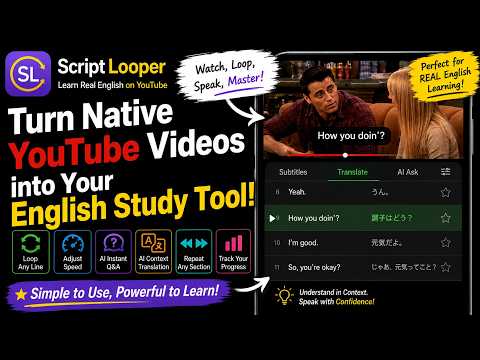
문장·구간 반복, 속도·싱크 조정, 문장·이디엄·문법 맥락 해석/설명을 원클릭·원터치로. PC·안드로이드·아이폰 지원.
Script Looper 이용 방법 Script Looper 홈화면 띄우기 Script Looper 확장 프로그램 설치=>컴퓨터 화면 우측 상단의 확장프로그램 버튼 클릭=> Script Looper 고정 버튼 클릭=>확장 프로그램 버튼 옆에 Script Looper 버튼이 생성됩니다. 이 버튼을 클릭하면 우측에 Script Looper 홈화면이 뜹니다. 유튜브 동영상 선택하여 열기 홈화면에서 전체 추천 채널을 클릭하면 열리는 Script Looper YouTube Picks 블로그에서 자신의 수준, 취향, 목적 등에 맞는 유튜브 동영상을 선택하여 엽니다. AI 맥락 번역 및 자막 패널 병기 자막 패널 상단의 번역 버튼을 클릭하면 좌측에 ChatGPT 화면이 뜨고 번역이 진행되면서 자막패널에 자막별로 병기됩니다. 번역 및 병기가 완료되면 ChatGPT 화면이 닫힙니다. 영상이 길면 5분 구간 단위로 나누어 진행되도록 되어 있습니다. 번역병기가 완료된 번역구간 번호 버튼의 배경색이 청색이 됩니다. 배경이 청색인 버튼을 다시 클릭하면 병기된 번역이 닫힙니다. * ChatGPT 로그인 필요 (무료 및 유료 계정 모두 가능) 문장 단위 반복 재생 (Z, A/D, Space) Z 자판을 누르면 재생이 진행 중이거나 클릭한 자막이 하이라이트되면서 유튜브의 해당부분이 무한 반복재생됩니다. 반복재생 중 D/A 키를 누르면 다음/이전 자막으로 이동하여 반복재생되고 Z 키를 다시 누르면 반복재생이 해제됩니다. Space를 누르면 재생이 일시정지되고 다시 누르면 해제됩니다. 단어·이디엄·속어·문법 등 맥락 설명 단어, 이디엄, 속어표현, 문법 등 모르는 부분이 있으면 Space로 재생을 정지한 뒤 드래그합니다. 묻기 팝업이 뜨면 클릭합니다. 상황에 맞는 의미, 뉘앙스, 문법 등에 대한 맥락 설명과 예문(5개)이 생성됩니다. 예문을 클릭하고 C 키를 누르면 반복해서 읽어줍니다. A/D 키를 누르면 이전/이후 문장으로 이동하여 반복해서 읽어주고 다시 C를 누르면 반복이 해제됩니다. 선택구간 반복 재생 (X) 자막 패널에서 자막 중 일부 또는 여러 자막을 드래그한 뒤 X 키를 누르면 선택한 범위 전체가 하이라이트되며 자동 반복재생됩니다. X 키를 다시 누르면 반복재생이 해제됩니다. 자막·소리 싱크 조정 (1~4, Q/W/E/R) 자막구간과 소리구간이 어긋나면 1/2(시작 -0.1초/+0.1초), 3/4(끝 -0.1초/+0.1초), Q/W(시작 -0.5초/+0.5초), E/R(끝 -0.5초/+0.5초) 키로 소리구간의 시작/끝 지점을 조정하여 일치시킵니다. 재생 속도 조절 (<, >) 재생 속도를 늦추려면 < 키, 빠르게 하려면 > 키를 누릅니다. Script Looper 앱으로도 동일한 기능을 이용하여 학습할 수 있습니다. Script Looper 앱 사용 가이드: https://drenglish.tistory.com/entry/titleScript-Looper-%EC%82%AC%EC%9A%A9-%EA%B0%80%EC%9D%B4%EB%93%9Ctitlehead
4.3 out of 514 ratings
Details
- Version2.8.0
- UpdatedOctober 7, 2026
- Offered by김신호
- Size1.29MiB
- Languages21 languages
- Developer
Email
pkim8225@gmail.com - Non-traderThis developer has not identified itself as a trader. For consumers in the European Union, please note that consumer rights do not apply to contracts between you and this developer.
Privacy

This developer declares that your data is
- Not being sold to third parties, outside of the approved use cases
- Not being used or transferred for purposes that are unrelated to the item's core functionality
- Not being used or transferred to determine creditworthiness or for lending purposes
Support
For help with questions, suggestions, or problems, please open this page on your desktop browser