Item logo image for HarmonySync

HarmonySync

5.0(

3 ratings

)
Item media 4 (screenshot) for HarmonySync
Item video thumbnail
Item media 2 (screenshot) for HarmonySync
Item media 3 (screenshot) for HarmonySync
Item media 4 (screenshot) for HarmonySync
Item video thumbnail
Item media 2 (screenshot) for HarmonySync
Item media 3 (screenshot) for HarmonySync
Item media 4 (screenshot) for HarmonySync

Overview

Universal Music Playlist Migration Platform

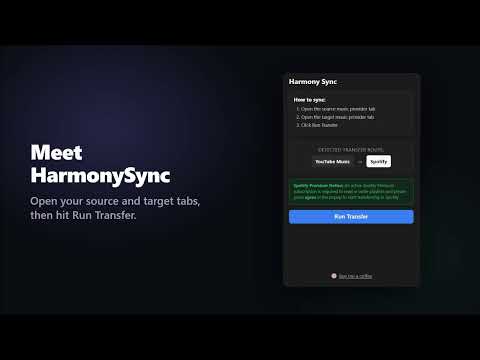
Harmony Sync: The Ultimate Playlist Converter & Music Transfer Extension Harmony Sync is a lightweight, fully automated Chrome extension that lets you instantly convert, migrate, and transfer your favorite playlists between major streaming platforms like Spotify, YouTube Music, Apple Music, Tidal, and Deezer. Stop wasting time manually searching for songs or paying expensive monthly subscriptions for third-party syncing services. Whether you are switching music streaming providers or just sharing playlists with friends, Harmony Sync runs directly in your browser. It leverages a smart matching engine to find, match, and save your tracks across platforms in real-time. Key Features Universal Playlist Migration: Seamlessly export and import playlists from Spotify, Apple Music, YouTube Music, Tidal, and Deezer. Easily move your entire music library to your active Spotify, Apple Music, or YouTube Music accounts. Smart Metadata Matching Engine: Automatically sanitizes track titles and cross-references artists to ensure the highest possible match accuracy when converting songs between platforms. Real-Time Transfer Tracking: Watch your bulk music transfer progress live with a built-in stopwatch, exact song processing counts, and an accurate ETA. Auto-Playlist Creation: Automatically generates a newly sequenced, organized playlist in your destination streaming account—no manual setup needed. 100% Free & Frictionless Setup: No third-party accounts, premium paywalls, or external dashboard logins required. Install the extension and start syncing your music immediately. How to Move Your Music in 4 Simple Steps Open a tab with the source playlist you want to export. Open a second tab for your destination music streaming platform. Click the Harmony Sync extension icon. Verify the auto-detected route (e.g., Tidal ➔ YouTube Music) and click Run Transfer. Privacy & Security First Harmony Sync operates entirely locally within your browser. Your authentication tokens, private playlists, and library data are never routed through, stored on, or analyzed by external developer servers. The extension communicates directly and exclusively with the official APIs of your selected music platforms for completely secure playlist synchronization.

Details

  • Version
    2.1.0
  • Updated
    November 13, 2026
  • Features
    Offers in-app purchases
  • Size
    775KiB
  • Languages
    English
  • Developer
    Email
    arvinth.balasubramanian@gmail.com
  • Non-trader
    This developer has not identified itself as a trader. For consumers in the European Union, please note that consumer rights do not apply to contracts between you and this developer.

Privacy

Manage extensions and learn how they're being used in your organization

HarmonySync has disclosed the following information regarding the collection and usage of your data. More detailed information can be found in the developer's privacy policy.

HarmonySync handles the following:

Authentication information
Website content

This developer declares that your data is

  • Not being sold to third parties, outside of the approved use cases
  • Not being used or transferred for purposes that are unrelated to the item's core functionality
  • Not being used or transferred to determine creditworthiness or for lending purposes

Support

For help with questions, suggestions, or problems, visit the developer's support site

Related

Spotify Playback Speed

4.6

Adds a button and menu to manipulate playback speed on Spotify Web.

AI Music Badge

3.0

Adds an "AI" badge next to AI-generated artists on Spotify, YouTube Music and YouTube.

Flow Speed for YouTube

0.0

A minimalist, UI-driven video speed controller with smart music detection.

SubShift: Transfer your YouTube subscriptions

4.1

Backup, export, and transfer your YouTube subscriptions with one click. Never lose your curated content feed again.

StylePeek AI - Free AI Virtual Try On

5.0

AI-powered virtual try-on for clothing items on e-commerce websites

Auto HD for YouTube – 4K, 60 FPS & Premium

0.0

YouTube Auto HD: every video plays in your chosen quality up to 4K or 8K, with separate 60 FPS and Shorts settings. No menu pop-ups.

Glance

0.0

An Apple-style Glance for your browser! Syncs with media, extracts album colors, shows live lyrics, and adds PiP controls.

LeverageLanguage - AI Learning Assistant

0.0

AI language learning with pronunciation, grammar analysis & subtitle capture for YouTube, Netflix, Udemy, Coursera

Lado — Key & BPM Overlay

0.0

Instant BPM, key & Camelot for YouTube, SoundCloud and Bandcamp. Tap tempo, metronome, pitch reference. No account, no tracking.

YouTube Music: Always Song Mode

1.8

Forces the YouTube Music player onto the audio-only "Song" tab so it never streams the music video.

PlaylistMover - Spotify to YouTube Converter

4.0

Easily convert and transfer your Spotify playlists to YouTube for free. The ultimate Spotify to YouTube playlist converter.

Better Lyrics (Lyrics for YouTube Music)

5.0

Enhance YouTube Music with beautiful time-synced lyrics, multilingual support, real-time translations and more

Spotify Playback Speed

4.6

Adds a button and menu to manipulate playback speed on Spotify Web.

AI Music Badge

3.0

Adds an "AI" badge next to AI-generated artists on Spotify, YouTube Music and YouTube.

Flow Speed for YouTube

0.0

A minimalist, UI-driven video speed controller with smart music detection.

SubShift: Transfer your YouTube subscriptions

4.1

Backup, export, and transfer your YouTube subscriptions with one click. Never lose your curated content feed again.

StylePeek AI - Free AI Virtual Try On

5.0

AI-powered virtual try-on for clothing items on e-commerce websites

Auto HD for YouTube – 4K, 60 FPS & Premium

0.0

YouTube Auto HD: every video plays in your chosen quality up to 4K or 8K, with separate 60 FPS and Shorts settings. No menu pop-ups.

Glance

0.0

An Apple-style Glance for your browser! Syncs with media, extracts album colors, shows live lyrics, and adds PiP controls.

LeverageLanguage - AI Learning Assistant

0.0

AI language learning with pronunciation, grammar analysis & subtitle capture for YouTube, Netflix, Udemy, Coursera

Search
Clear search
Close search
Google apps
Main menu