


Overview
Harbor
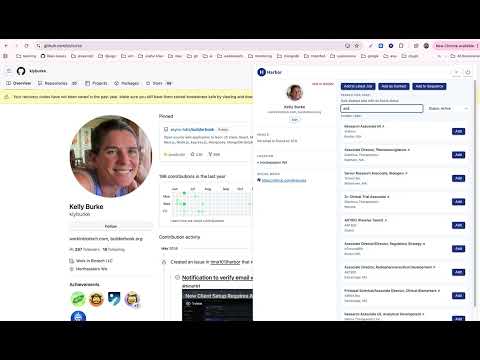
Overview The Harbor Chrome extension is a companion tool for the Harbor recruitment platform (findharbor.com). It is designed specifically for hiring managers and recruiters to streamline their candidate sourcing and talent acquisition workflows directly from their browser. Instead of switching between tabs to manually enter data, users can seamlessly capture and sync candidate information straight into their Harbor workspace. Primary Purpose The primary functionality of this extension is to allow users to quickly capture candidate and client profiles, resumes, and contact information from external websites (LinkedIn, GitHub) and import them directly into the Harbor Applicant Tracking System (ATS). Key Features - One-Click Candidate Sourcing: Instantly parse and extract relevant candidate details (such as name, experience, and contact info) from professional networks and portfolio sites. - Seamless Pipeline Integration: Send sourced candidates directly to specific job requisitions or talent pools within your Harbor account via our secure API. - Duplicate Detection: Automatically check if a candidate already exists in your Harbor database before importing, keeping your talent records clean and organized. - Quick Notes & Tags: Add contextual notes, tags, and ratings to a candidate's profile directly from the extension interface before saving them to the platform. How to Use - Install the Harbor extension and pin it to your browser toolbar. - Log in using your existing Harbor platform credentials. - While browsing a prospective candidate's profile on a supported sites (LinkedIn and GitHub), click the Harbor icon. - Review the auto-populated data, select the target job pipeline, and click "Import to Harbor." Please Note: An active account on the Harbor recruitment platform is required to use this extension. Who Should Use This? This tool is built for recruitment teams, HR professionals, and hiring managers who actively source talent online. Terms of Service https://findharbor.com/terms Privacy Policy https://findharbor.com/privacy Support https://findharbor.com/support Version Version: 1.6.4
4.7 out of 59 ratings
Details
- Version1.6.4
- UpdatedSeptember 29, 2026
- Size570KiB
- LanguagesEnglish (United States)
- DeveloperWebsite
Email
admin-pqaxx7@talenttrackr.com - Non-traderThis developer has not identified itself as a trader. For consumers in the European Union, please note that consumer rights do not apply to contracts between you and this developer.
Privacy

Harbor has disclosed the following information regarding the collection and usage of your data. More detailed information can be found in the developer's privacy policy.
Harbor handles the following:
This developer declares that your data is
- Not being sold to third parties, outside of the approved use cases
- Not being used or transferred for purposes that are unrelated to the item's core functionality
- Not being used or transferred to determine creditworthiness or for lending purposes
Support
For help with questions, suggestions, or problems, please open this page on your desktop browser