


Overview
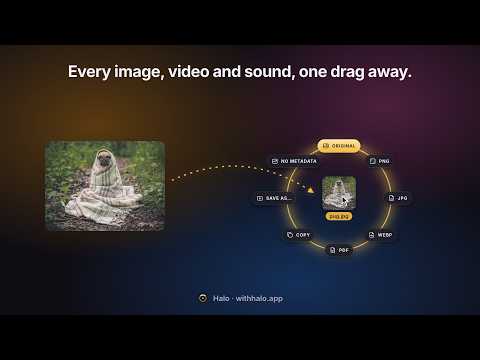
Drag an image, video or sound, tap Shift, choose: the original, a crop, a trim, no background, the text in it, a transcript.
Start dragging anything on a page — an image, a video, a sound, a link — and tap Shift. A ring of options opens around your pointer. Move toward one and let go. The file is in Downloads/Halo. Each ring has its own key: Shift for Save, Option (Alt on Windows) for the tools, Command (Ctrl on Windows) for AI. Let go in the middle of the ring to preview what you're holding first. THE ORIGINAL, NOT THE THUMBNAIL Google Images, Pinterest, X, Reddit, Amazon and most sites show you a small copy. Halo finds the full-size file behind it. VIDEO THAT ACTUALLY SAVES Many videos aren't a file — they stream in pieces. Halo rebuilds them from the pieces the page already loaded, joins sound and picture, and gives you one MP4 that plays everywhere, QuickTime included. FIX IT BEFORE YOU SAVE IT Tap Option (Alt on Windows) for the tools. They open right in the ring, grown into a frame around the picture or video, and they're one editor: crop it, fix its colours, mark it up, then save once. Save applies it all to the full-size original. • Crop to 1:1, 4:5, 16:9 or an exact size. Turn and flip. • Edit brightness, contrast, warmth and colour. • Redact: cover or blur what shouldn't be seen. Halo can find every line of text for you. • Annotate with arrows, boxes, circles, highlights, numbered steps and text. • Background: set a picture on a colour or gradient, with padding, round corners and a shadow. • Compress to JPG or WebP, and see the new size before you save. • Trim a video to the part you want: as an MP4, a GIF, or just the sound. • Split a video into clips, or cut parts out. • Speed a video up or slow it down, with voices kept natural. • Compress a video, and see how big it will be first. Trim, speed up and compress a video in one go, and get one file. Undo and redo across all of it, and Copy a picture to paste it straight into a chat or an email. A FORMAT THAT OPENS Save any image as PNG, JPG, WebP or PDF instead of a format your apps won't open. Copy it to the clipboard. Save it without its hidden metadata (camera, location). Save a video without its sound. THE SOUND, THE CAPTIONS, THE COVER Save just a video's sound as an M4A, its captions as an SRT file, or its cover image. Or see 12 moments from across a whole video on one frame grid. Drag a link to a sound file to save it as WAV, or trim it on its waveform. FILES FROM YOUR COMPUTER TOO Drag an image, a video or a sound file in from your desktop, over any page, and tap a key: convert it, crop it, trim it, take out its background, all on your computer. Don't tap a key and the site's own upload box gets it, as always. FRAMES AND TRANSCRIPTS Grab the frame you're looking at from any video. On YouTube, save or copy the transcript, copy a link at the current time, or open YouTube's own Clip tool. AI, RIGHT IN THE RING Tap Command (Ctrl on Windows) for the AI tools. • On your device: remove a background, copy the text out of a screenshot, upscale a small image 2×, copy a picture's main colours. • With Chrome's built-in AI: the key points of a YouTube video, or its transcript in your language. • In Halo's cloud, with AI credits (100 come with a licence): a sharper cut-out, a 4× upscale, or a transcript of any video. • And Google Lens, one move away. MAKE IT YOURS Gold, Pearl or Ice. A thin or bold ring. Light, dark, or following your system. PRIVATE BY DESIGN Everything happens in your browser, the editing tools and the on-device AI included. Halo never sends the pages you visit or the files you save anywhere. Only when you choose a cloud tool (marked ✦) does Halo send that one picture, or a video's sound, to be processed. The privacy policy names who processes it and for how long. FREE TO TRY 50 free uses, every tool included. Then unlock Halo for good with a one-time licence. No account, no subscription. Halo does not download YouTube videos or protected (DRM) video.
0 out of 5No ratings
Details
- Version1.0.0
- UpdatedOctober 28, 2026
- Size8.04MiB
- LanguagesEnglish
- DeveloperWebsite
Email
team@saasgate.xyz - Non-traderThis developer has not identified itself as a trader. For consumers in the European Union, please note that consumer rights do not apply to contracts between you and this developer.
Privacy

Halo – Image, Video & Audio Saver has disclosed the following information regarding the collection and usage of your data. More detailed information can be found in the developer's privacy policy.
Halo – Image, Video & Audio Saver handles the following:
This developer declares that your data is
- Not being sold to third parties, outside of the approved use cases
- Not being used or transferred for purposes that are unrelated to the item's core functionality
- Not being used or transferred to determine creditworthiness or for lending purposes
Support
For help with questions, suggestions, or problems, please open this page on your desktop browser