


Overview
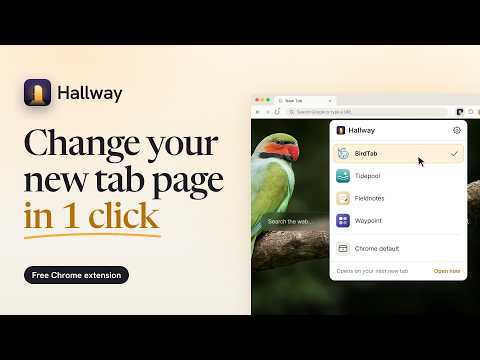
Change your new tab page in one click. Switch between the new tab extensions you have installed, without turning them off and on.
Got more than one new tab page extension? Chrome lets only one of them own the page you see when you press ⌘T or Ctrl+T: whichever was installed or turned on last. Hallway lets you change your new tab page in one click, without digging through chrome://extensions to turn one off and another on. ONE CLICK Click Hallway in the toolbar and choose. The next tab you open shows your pick exactly as if it were the only one installed: the address bar is focused, with no redirect and no flash. ⌘ or Ctrl + click switches and opens a tab at once. Chrome's own page is always in the list too. FINDS THEM FOR YOU Hallway asks Chrome which of your extensions replace the new tab page, so every one of them shows up, whatever it calls itself and in any language. Nothing to configure. Works with two, five or twenty. WORKS WITH ANY OF THEM Dashboards like Momentum, speed dials, photo wallpapers, to-do lists: if an extension replaces your new tab page, Hallway lists it. These extensions can't step aside for each other, so Hallway does it for them. Hallway isn't affiliated with any of them. TRIED A NEW ONE? ONE CLICK BACK Install another and Chrome hands it your tab. Hallway notices, lights a small dot on the button, and offers to take you back to the one you had. TURNED OFF? HALLWAY SAYS SO If Chrome, an update or anything else turns off the one you picked, Hallway tells you, and one click turns it back on. ON A SCHEDULE Hallway can switch for you: one during work hours and another the rest of the time, or a different one each day. Pick one yourself and it stays until the next change. FASTER STILL • Alt+Shift+N jumps to the next one in your list and opens it. • Right-click the button for a "Switch to" menu. • The button shows the current one's icon in its corner. • Drag to reorder, number keys to pick, and a filter when you have lots. AN EXTENSION MANAGER FOR ONE JOB Hallway enables the one you pick and disables the others in your list. Turning one off doesn't erase its settings or data. Other extensions are left alone. The one exception is a new tab extension you took out of your list but left on: Hallway offers to turn it off, and does so only if you click. It never touches ones your organization manages, and if a switch fails, everything is put back the way it was. A WELCOME THAT'S REAL The first screen is a hallway of doors, one for each extension you've installed. Open a door and it changes for real; press ⌘T and see it. Thirty seconds, no slideshow. PRIVATE BY DESIGN No account, no server, no analytics, no network requests at all. Your list syncs to your other computers; everything else stays on this one, and nothing is sent to us or anyone else. Light and dark themes, full keyboard and screen reader support. Works in Chrome and Microsoft Edge. Chrome is a trademark of Google LLC.
0 out of 5No ratings
Details
- Version1.2.0
- UpdatedOctober 25, 2026
- Size259KiB
- Languages30 languages
- DeveloperWebsite
Email
jai@mutabl.es - Non-traderThis developer has not identified itself as a trader. For consumers in the European Union, please note that consumer rights do not apply to contracts between you and this developer.
Privacy

This developer declares that your data is
- Not being sold to third parties, outside of the approved use cases
- Not being used or transferred for purposes that are unrelated to the item's core functionality
- Not being used or transferred to determine creditworthiness or for lending purposes
Support
For help with questions, suggestions, or problems, please open this page on your desktop browser