


Overview
Download images from websites, capture full-page screenshots, convert WebP files to PNG/JPG, & export webpages as HD PDFs & ZIP.
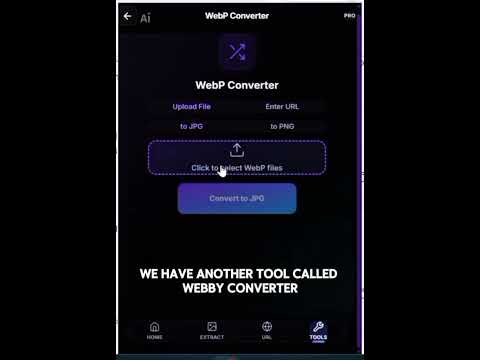
PixGrab is a lightweight utility to extract images from websites, capture screenshots, convert WebP files, and save webpages as PDFs directly from your browser. KEY FEATURES: 1. Image Extraction: • Extract images from your current active tab or by entering webpage URLs. • Automatic filtering hides tracking pixels, tiny icons, and spacers. • Srcset resolution detection helps retrieve original source images rather than small thumbnails. • Interactive preview grid allows selecting specific images or downloading all as a ZIP archive. 2. WebP Converter: • Convert WebP images to standard PNG or JPG formats. • Supports drag-and-drop file upload with image previews. • Download converted files individually or together in a ZIP package. 3. Webpage to PDF: • Convert web pages into clean, readable PDF documents. • Preserves page layout, background styling, and typography. • Supports single URL and batch URL conversion. 4. Screenshot Tool: • Capture the visible area or full scrolling page of your active tab. • Batch capture mode: enter multiple URLs to capture full-page screenshots and export them in a single ZIP file. • Automatic header handling prevents repeating fixed navigation bars during full-page captures. 5. Images to PDF: • Combine multiple images into a structured PDF document. • Standard page sizing with clean formatting for sharing and printing. HOW TO USE: 1. Click the PixGrab icon in your Chrome toolbar. 2. Choose a tool from the menu: Tab Images, URL Scraper, WebP Converter, Webpage to PDF, or Screenshot. 3. Preview your extracted images, screenshots, or converted documents. 4. Click Download or Export ZIP to save your files. PRIVACY & PERMISSIONS: • No account or sign-up required. • Processed files are temporary and not retained after download. • PixGrab does not track your browsing history or collect personal information. • Network requests are only made when you explicitly trigger an extraction or conversion action.
4.3 out of 53 ratings
Details
- Version1.1.5
- UpdatedSeptember 26, 2026
- FeaturesOffers in-app purchases
- Size597KiB
- LanguagesEnglish (United States)
- DeveloperHassan Saeed ChohanWebsite
House No 359, Mohallah Sheikhan , Zafarwal Tehsil Zafarwal District Narowal Zafarwal, Narowal 54000 PKEmail
hassanchohan10@gmail.comPhone
+92 301 1226722 - TraderThis developer has identified itself as a trader per the definition from the European Union and committed to only offer products or services that comply with EU laws.
Privacy

PixGrab - Image Downloader, Screenshot & PDF Tool has disclosed the following information regarding the collection and usage of your data. More detailed information can be found in the developer's privacy policy.
PixGrab - Image Downloader, Screenshot & PDF Tool handles the following:
This developer declares that your data is
- Not being sold to third parties, outside of the approved use cases
- Not being used or transferred for purposes that are unrelated to the item's core functionality
- Not being used or transferred to determine creditworthiness or for lending purposes
Support
For help with questions, suggestions, or problems, visit the developer's support site