

screensnap.
2 ratings
)
Overview
Free, local, watermark-free screen recorder & screenshots. Timeline editor: trim, zoom, audio, annotate. Export native MP4 or GIF.
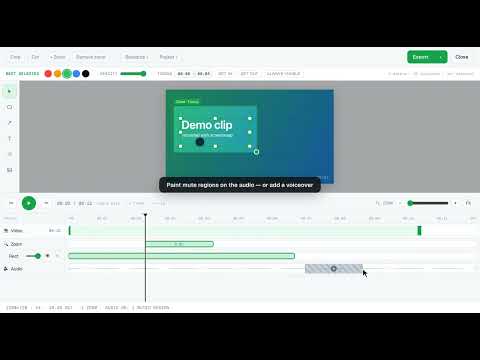
v1.5 has been released with the following updates: • Share a recording with a link. From the recording-done card or the editor's Export menu, screensnap uploads the clip to your own Google Drive, marks it "anyone with the link", and gives you a share page that plays it back. Sharing is per recording and opt-in, so your other recordings stay private. • A branded share page at screensnap.xyz that plays your recording for anyone you send the link to. Nothing is hosted by screensnap; the video streams from your own Drive. v1.4 has been released with the following updates: • Optional backup to your own Google Drive. Connect your Drive once in the new Settings tab and finished recordings can upload themselves to a private screensnap folder, or send single clips from the recording-done card and the editor. Off by default, and nothing else leaves your machine. • Upload an edited MP4 to Drive straight from the editor's Export menu. • A guided Cloud setup window, plus live upload progress on the done card and in the editor. v1.3.1 added: • Undo in the editor. Ctrl+Z (cmd+Z on Mac) reverts an accidental move, resize, or delete, and shift redoes it. • Tab recordings now survive going fullscreen mid-take. • Starting a second recording right after the first now works cleanly. • The selection outline clears when you click away from it. v1.3 added: • A proper multi-track timeline in the video editor. The video, every overlay, and the audio each get their own track, with drag to move, drag edges to resize, and snapping. • Annotations, images, and GIFs can now be resized right on the video, and shown for just part of the clip. • Audio editing on the timeline. Mute regions without cutting the picture, adjust the volume, or mix in a voiceover or music track from a file. • New 720p and 1080p export presets that genuinely shrink file sizes. Screen recording shouldn't cost money, put a watermark on your video, or make you sign up. screensnap records your screen and takes screenshots for free. There's no time limit, no account, and no forced cloud. Everything stays on your machine unless you turn on the optional backup to your own Google Drive, and all of it is open source. Feature requests are welcome on GitHub. RECORD ANYTHING, FREE AND UNLIMITED • Your whole screen, any app window, or a single browser tab, saved as native MP4 (H.264/AAC). • Screen + Cam puts your webcam in an always-on-top bubble with pause and stop right on it. Set it up first (circle or square, mirrored or not), then record. • Capture system or tab audio and your microphone, with pause, resume, and mic mute. • On-page and floating controls, plus global keyboard shortcuts for stop, pause, and restart. • Draw on the screen while you record (strokes fade out on their own), restart a take, or hide the camera mid-recording. • No upgrade prompts and no "pro" tier. It's all just free. A REAL VIDEO EDITOR, ALSO FREE • A multi-track timeline. The video, each overlay, and the audio get their own track. Drag blocks to move them, drag the edges to resize, and everything snaps into place. • Trim the ends, or cut mistakes out of the middle. • Zoom into the action with draggable focus blocks that ease in and out. • Add text, arrows, boxes, blur, logos, images, and animated GIFs. Resize them right on the video and set when they appear and disappear (circle something, then stop circling it). • Undo and redo. Ctrl+Z (cmd+Z on Mac) reverts a move, resize, or delete, and shift redoes it. • Edit the audio. Mute regions without cutting the picture, change the volume, or mix in a voiceover or music track from a file. • Crop free-form or to a ratio (16:9, 1:1, 9:16, 4:3), change the speed, or wrap the video in a gradient backdrop with rounded corners and a shadow. • Export a native MP4 (pick 720p or 1080p to shrink the file) or an animated GIF, or download the original untouched. Every frame is encoded on your device. SCREENSHOTS • Visible area or full page, saved as PNG. • Annotate before saving with text, arrows, shapes, highlight, and blur. • Crop, reorder layers, add an image or logo, and come back later to re-edit your text. • Add a padded backdrop, then copy to the clipboard or save to your computer. OPTIONAL CLOUD BACKUP (YOUR DRIVE, NOT OURS) • Connect your own Google Drive and finished recordings can upload themselves to a private screensnap folder, with progress shown as they go. • Or upload one clip at a time from the recording-done card or the editor's Export menu. • Straight from your browser to Google. No screensnap servers, no middleman, no account with us, and it only uses Google's narrowest Drive permission, so screensnap can only ever see the files it created. • Off by default. Disconnect anytime and the access is revoked at Google. PRIVATE BY DESIGN • Capture, processing, and storage all happen locally. Nothing leaves your device unless you connect the optional Google Drive backup. • No screensnap servers, no telemetry, no analytics. The only network calls are the uploads you choose to send to your own Drive. • Minimal permissions. Screen and window sharing use Chrome's own picker, and screensnap only touches the tab you point it at. It has no background access to your browsing.
5 out of 52 ratings
Details
- Version1.5.0
- UpdatedAugust 2, 2026
- Offered byDMSolutions Publishing
- Size564KiB
- LanguagesEnglish
- Developer
Email
daniel.mcclure.199000@gmail.com - Non-traderThis developer has not identified itself as a trader. For consumers in the European Union, please note that consumer rights do not apply to contracts between you and this developer.
Privacy

This developer declares that your data is
- Not being sold to third parties, outside of the approved use cases
- Not being used or transferred for purposes that are unrelated to the item's core functionality
- Not being used or transferred to determine creditworthiness or for lending purposes
Support
For help with questions, suggestions, or problems, visit the developer's support site