


概要
Sort Hacker News your way — by points, time, or comments — instantly.
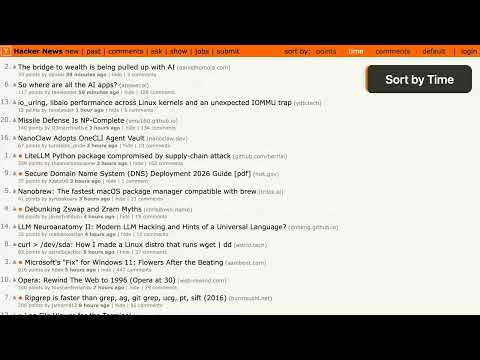
Hacker News has one ranking algorithm. It's good, but sometimes you want a different view. This extension adds sort controls directly into the HN header bar - sort by points, time, comments, or switch back to the default order. One click, the page reorders instantly. No reload, no new tab. Sort by points to find the most upvoted stories. Sort by time to catch posts that just landed. Sort by comments to see what people are actually discussing. Hit "default" to go back to HN's original order. The active sort is highlighted so you always know which view you're in. It works on every Hacker News page that has a post list: the front page, Newest, Ask HN, Show HN, Jobs, and past - all of them. NEW POST INDICATORS An orange dot appears next to posts that showed up since your last visit. Instead of scanning the entire front page, trying to remember what you've already seen, new posts are marked for you. The dots fade out gradually over time. The default fade duration is one hour, but you can set it anywhere from 10 seconds to 24 hours in the extension settings. When the highlight period ends, the dots disappear. New post detection runs only on the first page of each section; paginated pages are skipped. Toggle new post indicators on or off from the extension popup. TRUE TIME AGO Hacker News has a "second chance" system that resurfaces older posts. When a post gets a second chance, HN resets the displayed age - so a post submitted three days ago might show "7 hours ago" on the front page. That's confusing. This extension reads the original submission timestamp and shows the real age. If a post is actually three days old, it says "3 days ago" regardless of when HN resurfaced it. On by default. Turn it off in settings if you prefer HN's original age text. KEYBOARD SHORTCUTS P sorts by points. T sorts by time. C sorts by comments. D restores the default order. The shortcuts only fire while you're browsing - they disable automatically when you're typing in a search box, text field, or any input. If you use Vimium or another extension that captures the same keys, the shortcuts step aside. No conflicts. SYNCS ACROSS DEVICES Your sort preference, new post data, and all settings sync through Chrome's built-in sync storage. Set up the extension on your laptop, and your desktop picks up the same preferences. No extra account needed - just your Chrome profile. SETTINGS Click the extension icon to open the settings popup. From there, you can toggle new post indicators, adjust the highlight fade duration, and switch true time ago on or off. Each setting has a short description explaining what it does. If Hacker News ever changes its page layout in a way that breaks sorting, the extension detects it. You'll see a warning badge on the icon and a banner in the popup instead of silent failures or broken pages. PRIVACY No data leaves your browser. No analytics, no tracking, no external API calls. The extension reads the HN page to parse post data and stores your preferences in Chrome's sync storage. That's it. Source code: https://github.com/svyatov/hacker_news_sorted Recent changes: 2026-03-24 - v2.5.0 - True time ago, new post fade cooldown, redesigned settings 2026-03-13 - v2.4.0 - Layout change detection, more reliable selectors 2026-03-11 - v2.3.1 - Fix selectors for HN layout update 2026-01-29 - v2.3.0 - New post indicators, popup settings, cross-device sync 2026-01-12 - v2.2.0 - Keyboard shortcuts, Vimium compatibility
5 点満点で 52 件の評価
詳細
- バージョン2.5.0
- 更新:2026年3月27日
- 提供元Leonid Svyatov
- サイズ148KiB
- 言語English
- デベロッパー
メール
leonid@svyatov.com - 非取引業者このデベロッパーは取引業者として申告していません。EU 加盟国の消費者とこのデベロッパーとの間に締結された契約には、消費者の権利が適用されません。
プライバシー

このデベロッパーは、お客様のデータについて以下を宣言しています
- 承認されている以外の用途で第三者に販売しないこと
- アイテムの中心機能と関係のない目的で使用または転送しないこと
- 信用力を判断する目的または融資目的で使用または転送しないこと
サポート
質問や提案、問題がある場合は、パソコンのブラウザでこのページを開いてください