

Habitus Lens — Watch any-language video, explained by an expert in yours
1 rating
)
Overview
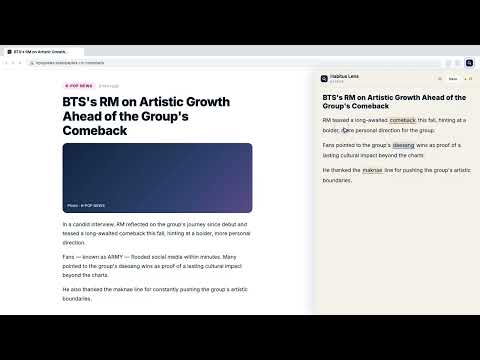
Watch YouTube in any language. An expert lens turns any video into commentary cards in your language — terms, context, and insight.
🌐 Watch any video. In your language. Through an expert's eyes. Habitus Lens turns any YouTube video — in any language — into clear commentary cards in YOUR language. Pick an expert lens, click Explain, and get the key terms, cultural context, and insider insight a domain expert would point out. Fully localized in English, Korean, Japanese, Spanish, and Chinese. ▶️ YOUTUBE-FIRST, ANY LANGUAGE Watching a Korean variety show, a Spanish football breakdown, a Japanese tech talk, or an English lecture? Habitus Lens reads the video and explains it in the language you actually think in — so nothing gets lost in translation. 🎓 40+ EXPERT LENSES Don't just watch — understand it like a pro. Choose the angle and let a specialist do the explaining: • K-Pop Deep Dive — cultural context, industry structure, and fandom insight • Soccer Tactician — players, formations, and the tactics behind the play • Cinephile Bestie — director's intent, symbolism, and film context • Investment Analyst — market signals and the logic behind the numbers • And 35+ more: Legal, Medical, Tech, Research, Marketing, History, Psychology, and industry-specific lenses 🃏 COMMENTARY CARDS IN YOUR LANGUAGE Every explanation lands as a clean card with three layers — Why It Matters, Expert View, and Action Tip. Hover to read, click to expand, save to keep. 💎 COLLECT INSIGHTS Save the cards that matter and build a personal knowledge library you can revisit and search — across YouTube and the open web. 🌐 ALSO WORKS ON THE OPEN WEB Articles, research papers, social posts, shopping pages — drag to select any passage and get the same expert commentary in your language. ———————————————————— 🌟 KEY FEATURES • YouTube-native: reads video transcripts and explains them in your language • 40+ expert lenses: from K-Pop to Legal to Medical — one click to switch perspectives • Interactive cards: hover over highlights for deep-dive expert explanations • Side panel workspace: review every commentary card in a clean, organized panel • Smart Suggest: recommends the best expert for what you're watching • Privacy-first: we only analyze what you ask for. Your data is yours. 🎯 PERFECT FOR • Global viewers — enjoy content from any country without a language barrier • Fans & hobbyists — get the cultural context behind K-Pop, film, football, and more • Students & researchers — understand lectures, talks, and papers in any language • Professionals — stay on top of global industry content in the language you think in 📦 PLANS • Plus (Free): 100 free explanations to start, all 40+ expert lenses, community features • Pro: 300 explanations/month, PDF analysis, custom lenses, priority AI • Enterprise: custom domain training and SSO for teams (Guest access: 5 explanations/day, no sign-up needed) Install Habitus Lens today and watch the world in your language.
1 out of 51 rating
Details
- Version3.2.0
- UpdatedJune 28, 2026
- Offered bycamelus.tedin
- Size4.53MiB
- Languages5 languages
- Developer
Email
camelus.tedin@gmail.com - Non-traderThis developer has not identified itself as a trader. For consumers in the European Union, please note that consumer rights do not apply to contracts between you and this developer.
Privacy

Habitus Lens — Watch any-language video, explained by an expert in yours has disclosed the following information regarding the collection and usage of your data. More detailed information can be found in the developer's privacy policy.
Habitus Lens — Watch any-language video, explained by an expert in yours handles the following:
This developer declares that your data is
- Not being sold to third parties, outside of the approved use cases
- Not being used or transferred for purposes that are unrelated to the item's core functionality
- Not being used or transferred to determine creditworthiness or for lending purposes
Support
For help with questions, suggestions, or problems, please open this page on your desktop browser