

Guardian Lock
2 ratings
)
Overview
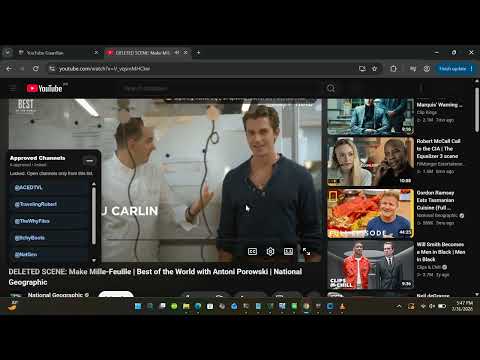
Guardian Lock controls YouTube with approved channels, multilingual support, Shorts blocking, PIN protection, and Commercial Shield.
Guardian Lock — Parent-Controlled YouTube Access Try Guardian Lock free for 7 days. Nothing is charged today. A payment method is required to start the trial. After 7 days, the subscription is $14.99 USD per year unless you cancel before the trial ends. One subscription covers up to 4 devices. Guardian Lock lets parents choose which YouTube channels their children can watch. When protection is locked, channels you have not approved are blocked. KEY FEATURES • Approved channels: Choose the channels your child can watch. • Shorts blocking: Block access to YouTube Shorts while protection is active. • Comments and recommendations: Hide distracting content around videos. • Commercial Shield: Cover YouTube advertisements and mute them while they play. • Parent PIN: Protect your settings from changes by your child. • Multilingual parent control panel: Parents can use Guardian Lock’s controls in English, Spanish (Español), Portuguese (Português), Korean (한국어), or Arabic (العربية). The Arabic interface supports right-to-left text. Guardian Lock works with Google Chrome on Windows 10 and 11 and on Chromebooks. HOW TO START 1. Start your 7-day free trial at https://youtubeguardianpro.com/pricing/ 2. Your activation key will be emailed to the address you use at checkout. 3. Install Guardian Lock from the Chrome Web Store. 4. Enter your key, approve channels, create your parent PIN, and lock protection. Guardian Lock was created by a homeschooling parent who wanted his children to enjoy useful YouTube content without unrestricted access to the platform. Guardian Lock is an independent product and is not affiliated with, endorsed by, or sponsored by YouTube or Google.
5 out of 52 ratings
Details
- Version3.2.27
- UpdatedSeptember 28, 2026
- FeaturesOffers in-app purchases
- Offered byGuardian Lock
- Size60.17KiB
- LanguagesEnglish (United States)
- DeveloperHarlan Stills
6317 Anderson St Texas City, TX 77591-4134 USEmail
guardianaitechnologies@gmail.comPhone
+1 512-548-9465 - TraderThis developer has identified itself as a trader per the definition from the European Union and committed to only offer products or services that comply with EU laws.
Privacy

This developer declares that your data is
- Not being sold to third parties, outside of the approved use cases
- Not being used or transferred for purposes that are unrelated to the item's core functionality
- Not being used or transferred to determine creditworthiness or for lending purposes
Support
For help with questions, suggestions, or problems, visit the developer's support site