

GTM Event Helper — GA4 & Meta Tag Creator

Overview
Create GTM tags in seconds. Click any element, get smart CSS selectors, build GA4 & Meta tags via API. AI Wizard for bulk setup.
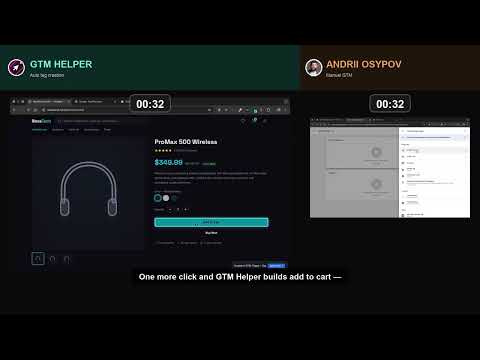
GTM Event Helper is the Chrome extension that turns Google Tag Manager from a manual, copy-paste chore into a two-click task. Point at any element on your website — button, form, link, product card — get a clean CSS selector with a stability rating, and create triggers + tags directly in your GTM workspace over the GTM API. No tab-switching. No manual JavaScript. No broken selectors that drift when the site ships a redesign. Covers GA4, Meta, TikTok and eight more analytics & ad platforms — all built via the official GTM API, so your container stays single-source-of-truth. ▸ 60-second demo (GTM Event Helper vs. the manual workflow): https://youtu.be/7G_g6720i5o HOW IT WORKS 1. Sign in with Google and pick your GTM account + container + workspace. 2. Hit Ctrl+Shift+E (Cmd+Shift+E on Mac) to enter Select Mode. Hover the element you want to track; the overlay shows the CSS selector plus a stability badge (Excellent / Good / Fair / Fragile). 3. Choose a trigger type, pick your platforms, click Create. The extension pushes everything straight to GTM over the official API. THE AI SETUP WIZARD (Pro) Forget building events one at a time. Describe your site (e.g. "Shopify storefront with a custom checkout") and the AI Setup Wizard scans your live page, proposes the full GA4 ecommerce funnel and creates every trigger, variable, and tag in one flow. Multi-platform in one shot: GA4 + Meta + TikTok tags created together per event. WHY IT'S DIFFERENT There are ten Chrome extensions that help you DEBUG tags. This is the only one that CREATES them. That's the whole pitch. • Smart selector engine — ID, data-attributes, ARIA, nth-child, CSS-in-JS, hashed Tailwind/styled-components classes • Element freeze mode for hover menus, dropdowns, shadow DOM • Product list context detection for ecommerce category pages • Dynamic ecommerce extraction — AI writes real extraction functions, never hardcodes values • Pre-flight Measurement ID check so your GA4 tags never ship pointing at nothing • Built-in security gate audits every generated script server-side before it hits your container FREE PLAN • GA4 Event tags + Custom HTML tags • Visual element selector with stability badges • Manual trigger + tag creation (single event at a time) • Up to 3 GTM containers • Export GTM workspace configuration • Keyboard shortcut, right-click menu, context detection PRO ($20/month) • Everything in Free, plus: • AI Setup Wizard with multi-event, multi-platform batch creation • 11 tag types covering the major analytics & ad platforms • Unlimited GTM containers • Audit GTM — surface unused triggers, orphan tags, missing variables • Import workspace configurations • White-label option • Priority support BUILT FOR ECOMMERCE Track the full shopping funnel end-to-end — view_item, select_item, add_to_cart, view_cart, begin_checkout, purchase, refund, and more. Works on any e-commerce site where GTM runs. PRIVACY • Google OAuth token is used exclusively to talk to the GTM API; it never leaves your browser's storage • Page DOM is processed locally in your browser for selector generation • AI features send only the selected element's context to our backend — never full page content • No tracking, no ads, no third-party analytics on you • Privacy policy: https://gtmhelper.app/privacy SUPPORT Website: https://gtmhelper.app Pricing + FAQ: https://gtmhelper.app/pricing Feedback + feature requests: a.osipov@or.com.ua Built by an analytics engineer tired of building the same ecommerce tracking by hand. If there's a trigger you wish we handled better, tell us — we ship fixes weekly.
5 out of 55 ratings
Details
- Version1.6.9
- UpdatedSeptember 29, 2026
- FeaturesOffers in-app purchases
- Size296KiB
- Languages13 languages
- DeveloperOleksandra OsypovaWebsite
Zoi Gaidai 2-87 Kyiv 04207 UAEmail
snegir@gmail.comPhone
+380 50 360 0070 - TraderThis developer has identified itself as a trader per the definition from the European Union and committed to only offer products or services that comply with EU laws.
Privacy

This developer declares that your data is
- Not being sold to third parties, outside of the approved use cases
- Not being used or transferred for purposes that are unrelated to the item's core functionality
- Not being used or transferred to determine creditworthiness or for lending purposes
Support
For help with questions, suggestions, or problems, please open this page on your desktop browser