

GTM Copy Paste

Ringkasan
Copy your Tags, Triggers and Variables and Paste them into any other account
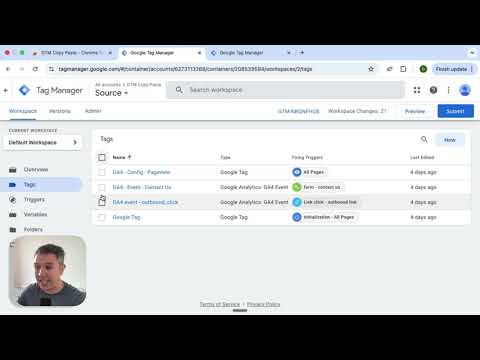
Easily Copy and Paste your Tags, Triggers, and Variables from one Google Tag Manager account to the next. Simply add them to the extension and then paste them into your intended account. Your items will be uploaded through the GTM API. You can put together your own menu of Tags, Triggers and Variables that you want to copy to another account. No more Container exports and reimports through the GTM Admin interface. Notes: - The relationship between Tags and Triggers will remain intact as long as they are part of the same "paste". - If an asset (Tag, Trigger or Variables) under the same name already exists, the extension will upload the asset with "(#)" attached to the end of the name. Updates: - Completely re-written the extension (March 2025): - newly improved "copy" experience - new UI for the clipboard - dependency check feature to add all dependancy to the clipboard - the oauth scope now ask for less permissions - now supports templates, tag sequencing, built-in variables and dependency rewrites Known issues: - If you edit an item right before you copy it to the clipboard, it might not have the changes in the paste. That’s because the extension is working with a cached version of the container. - If you copy a tag connected to a template, the upload might fail because it can’t find the reference - If you delete a dependant item from the clipboard, the upload might fail as it doesn’t have the right items to connect back while pasting
3,8 dari 557 rating
Detail
- Versi0.2.2
- Diupdate28 Maret 2025
- Ukuran625KiB
- BahasaEnglish
- DeveloperR2D2 Ltd.Situs Web
Room 2301, Bayfield Building, 99 Hennessy Road Wanchai Hong Kong 00000 Hong KongEmail
support@measureschool.com - Non-pedagangDeveloper ini tidak mengidentifikasi diri sebagai pedagang. Bagi konsumen di Uni Eropa, perlu diperhatikan bahwa hak konsumen tidak berlaku untuk kontrak antara Anda dan developer ini.
Privasi

Developer ini menyatakan bahwa data Anda
- Tidak dijual ke pihak ketiga, di luar kasus penggunaan yang disetujui
- Tidak digunakan atau ditransfer untuk tujuan yang tidak terkait dengan fungsi inti item
- Tidak digunakan atau ditransfer untuk menentukan kelayakan kredit atau untuk tujuan pinjaman
Dukungan
Untuk mendapatkan bantuan terkait pertanyaan, saran, atau masalah, buka halaman ini di browser desktop Anda