


खास जानकारी
अपने लॉग-इन किए हुए टैब में GST पोर्टल से GSTR-1, GSTR-2B और GSTR-3B एक साथ डाउनलोड करें, फिर उन्हें Excel में जोड़ें।
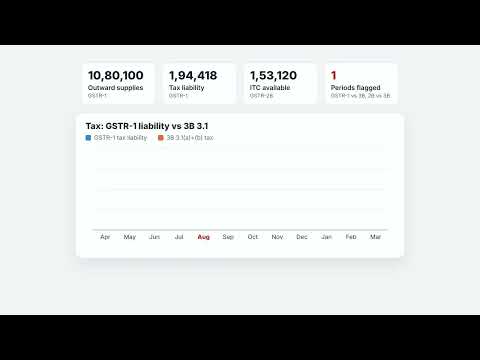
GSTR Auto Downloader saves hours for CAs, accountants and businesses who need months of GST returns rather than one at a time. Log in to the GST portal as usual, choose a period range, and the extension does the clicking for you, month after month, inside your own logged-in tab. Your portal session stays alive because every action is a real click on the portal page. WHAT IT DOWNLOADS GSTR-1: the filed return as JSON (full invoice data) or as the filed summary PDF. For JSON, the portal takes up to 20 minutes to prepare each month. The extension requests every month in one pass, keeps your session alive while the portal works, and collects the files automatically about 18 minutes later. Months that are not yet filed are skipped and reported. GSTR-2B: the portal's Excel workbook for each month. GSTR-3B: the filed PDF for each month, plus the return's figures (tables 3.1, 3.2, 4, 5.1 and 6.1) read from the same data the portal page uses, so they match what was filed. Files are named by GSTIN and period, for example GSTR1_27ABCDE1234F1Z5_072026.zip, and every client's files are kept separate. BUILT-IN CONSOLIDATION, NO OTHER SOFTWARE NEEDED GSTR-1 Sales Register: one row per invoice line, a tab per table including amendments, a month-wise summary with outward supplies and tax liability totals, a source sheet listing every file used, and an HSN check. GSTR-2B workbook: every month merged sheet by sheet, columns aligned by heading, each row tagged with its return period, with an ITC summary of available and not available credit. GSTR-3B month-wise summary: one row per period with ARN and filing date. Comparison and reconciliation: GSTR-1 versus GSTR-3B versus GSTR-2B month by month with variances flagged, and GSTR-2B matched against your purchase register (any Excel with GSTIN, invoice number and tax columns, such as a Tally export). Everything is built in your browser and saved to your Downloads folder as normal Excel files. PRIVATE BY DESIGN You always log in yourself. The extension never sees your password or OTP and never solves a captcha. It works only on gst.gov.in and cannot read any other website. There are no servers, no analytics and no accounts. Nothing leaves your computer. Copies of downloaded returns are kept in the browser's local storage so you can consolidate without re-selecting files. You can clear them at any time from the Consolidate page. WORKS WITH Monthly and quarterly (QRMP) filers. Multiple clients: switch GSTIN on the portal and the extension keeps each client's files apart. This is an independent tool by Krupanand & Co. It is not affiliated with, endorsed by, or connected to GSTN, the GST portal, or the Government of India. The workbooks it produces are working papers, not returns or official documents. Verify figures against the filed returns before relying on them.
वर्णन
- वर्शन1.9.7
- पिछली बार अपडेट होने की तारीख:21 सितंबर 2026
- ऑफ़र करने वालाkrupanandnandu
- आकार175KiB
- भाषाएं2 भाषाएं
- डेवलपरKrupanand Bammidi
3-104/26/9B/10B Seetharampuram Patancheru Sangareddy, Telangana 502319 INईमेल
krupanandnandu@gmail.comफ़ोन
+91 78937 96315 - व्यापारीयूरोपियन यूनियन की परिभाषा के मुताबिक, इस डेवलपर ने एक व्यापारी के तौर पर अपनी पहचान की है. साथ ही, यह डेवलपर सिर्फ़ ऐसे प्रॉडक्ट या सेवाएं उपलब्ध कराने के लिए प्रतिबद्ध है जो ईयू के कानूनों के मुताबिक हैं.
निजता

डेवलपर ने एलान किया है कि आपका डेटा
- जिन मामलों में इस्तेमाल की मंज़ूरी दी गई है उनके अलावा, किसी भी तीसरे पक्ष को नहीं बेचा जाता
- किसी ऐसे मकसद से इस्तेमाल या ट्रांसफ़र नहीं किया जाता जो आइटम के मुख्य फंक्शन के हिसाब से ज़रूरी नहीं है
- क़र्ज़ लेने या क़र्ज़ देने की स्थिति तय करने के लिए इस्तेमाल या ट्रांसफ़र नहीं किया जाता


